If you’re asking how much battery backup do I need for your apartment, the answer depends less on the square footage or bedroom count of your home than on which specific devices you want to keep running and for how long.
A single occupant in a studio apartment who needs to run a refrigerator and critical remote work equipment may require significantly more battery capacity than a family in a three-bedroom apartment that only wants to keep smartphones charged and a few LED lights on.
Apartment residents face unique physical and safety constraints that homeowners rarely encounter. Many renters searching for a backup generator for an apartment quickly discover that combustion generators powered by gasoline, diesel, or propane are unsafe indoors or on apartment balconies due to fatal carbon monoxide risks. According to the Government of Canada’s emergency preparedness guidelines, fuel-burning generators must operate outdoors at least 6 meters (20 feet) away from doors, windows, and building openings, with exhaust directed away from the property. In addition, residential leases, condo association (HOA) bylaws, and municipal fire codes frequently restrict fuel storage and combustion equipment. In a compact living space, backup equipment must store neatly, operate quietly without disturbing household members or neighbors, remain manageable to move during a power loss, and operate safely near living quarters.
This guide provides a practical way to calculate what you need, estimate actual battery runtimes, and select a practical, appropriately sized portable power station for home resilience without buying unnecessary hardware.
1. Decide What Actually Needs Power
During an urban blackout, the objective is keeping essential parts of your home running—maintaining communications, remote work capability, emergency lighting, and critical food preservation—rather than trying to run your entire home as if grid power were uninterrupted.
Classifying Essential vs. High-Draw Devices
| Appliance Category | Typical Devices | Average Power Draw (Watts)* | Priority Level |
|---|---|---|---|
| Communications | Wi-Fi Modem / Router, Fiber ONT | 10W – 25W | Essential |
| Mobile & Computing | Smartphone / Tablet Charging | 10W – 20W | Essential |
| Workstation | Laptop Workstation (Standard load) | 30W – 60W | Essential |
| Lighting | LED Desk / Floor Lamps (1–2 bulbs) | 10W – 25W | Essential |
| Food Preservation | Kitchen Refrigerator (18 cu. ft.) | 45W – 60W (Time-averaged) | User Priority |
| High-Draw Heating/Cooling | Space Heaters, Coffee Makers, Microwaves, Hair Dryers, AC Units | 1,000W – 1,800W | Generally Avoid on Small Batteries |
*Note: Power figures are illustrative estimates. Multi-device internet setups (such as a separate modem, router, and fiber terminal) may draw more power combined. Always measure your complete equipment setup with a plug-in watt meter for exact planning.
High-draw appliances that rely on resistive heating elements (such as portable space heaters, drip coffee makers, or hair dryers) consume 1,000W to 1,500W continuously. A 1,500W space heater could drain a 1,000Wh battery in roughly 34 minutes under a simplified efficiency assumption—if the power station supports 1,500W continuous output. Otherwise, its overload protection may prevent operation entirely. Plan to use warm clothing, insulated blankets, and non-electric methods for thermal comfort during short blackouts; extreme cold or hot weather requires a separate thermal safety plan. For step-by-step cold-weather insulation techniques, see our guide on how to stay warm in an apartment without power.
Evaluate Lower-Cost Alternatives First
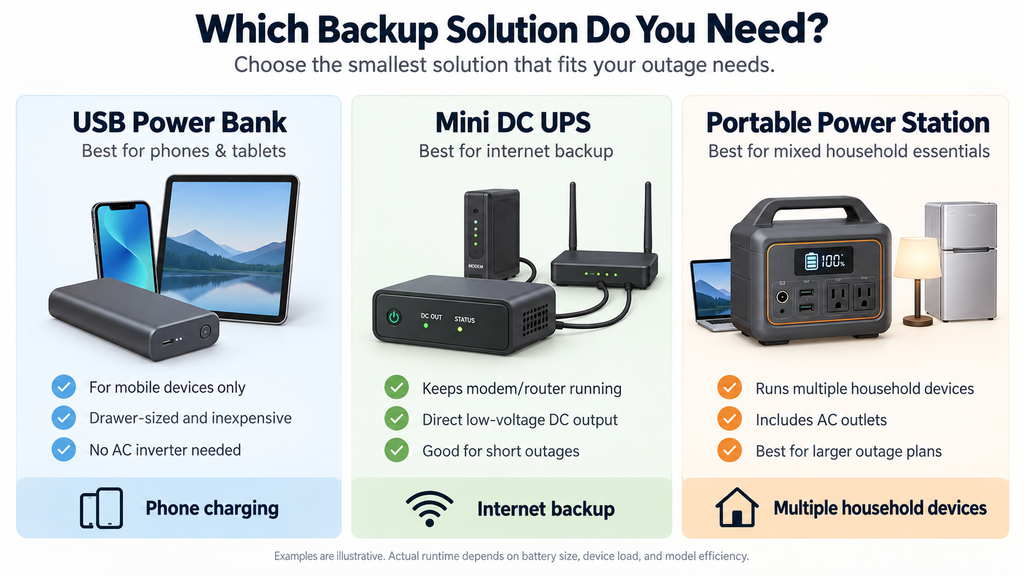
Before investing in a portable power station, evaluate whether a full battery system equipped with an AC inverter is actually required for your situation:
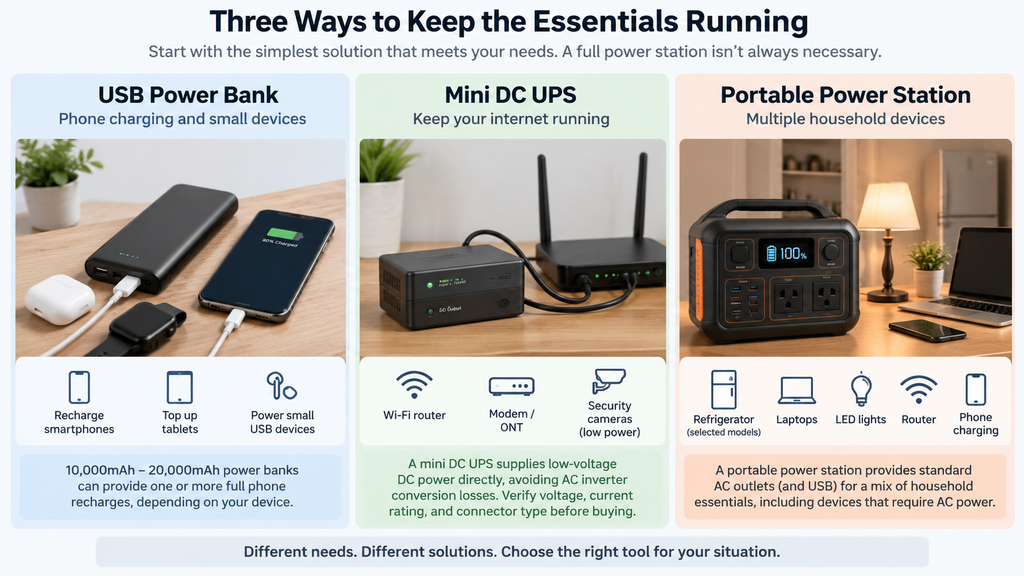
- Smartphones and Tablets Only: A standard 10,000mAh to 20,000mAh USB power bank ($25–$50 USD) provides one or more full smartphone recharges, depending on your phone’s battery capacity, charging efficiency, and power consumption during use. It requires periodic inspection and recharging, fits in a drawer, and avoids AC inverter conversion losses. For a complete device charging strategy, consult our power outage phone charging guide.
- Wi-Fi Router Continuity Only: If your goal is strictly to prevent your modem and Wi-Fi router from shutting down during brief grid flickers or short blackouts, a dedicated router UPS or mini DC UPS ($30–$50 USD) plugs directly between the wall outlet and your router. It supplies low-voltage DC power directly, avoiding AC inverter conversion losses. Note: Before purchasing, verify that the mini UPS’s output voltage, current rating, connector size, and polarity match your modem and router. Powering your home router preserves local Wi-Fi, but internet access also depends on whether your service provider’s external neighborhood infrastructure remains powered. For network hardware evaluation, see our dedicated guide on how to keep your internet and Wi-Fi working during a power outage. Note that a separate, independently battery-powered mini UPS runs on its own internal battery and runtime schedule, rather than drawing from your primary portable power station.
- Mixed Essentials and Refrigeration: When your backup plan requires AC electricity for a refrigerator, an AC laptop charger, or standard floor lamps, selecting a portable power station for an apartment is a flexible solution—though USB-C power banks, compatible DC lighting, and dedicated mini DC UPS devices may suffice for smaller electronic needs.
2. Watts vs. Watt-Hours: The Simple Explanation
To size a backup battery correctly, distinguish between electrical power demand and stored energy capacity:
- Watts (W): Instantaneous power demand or speed. This dictates how much output capacity the power station’s inverter must supply at any single moment.
- Watt-Hours (Wh): Stored energy capacity or fuel tank size. This determines how long your connected devices will run over time (1,000 Watt-Hours = 1 Kilowatt-Hour or kWh).
Calculating Battery Run Time and Capacity Needs
To calculate battery capacity needs accurately, distinguish between active-load AC conversion efficiency and time-dependent AC inverter idle draw:
- AC Active Conversion Loss (85% Usable Fraction): Converting direct current (DC) stored in the battery into alternating current (AC) used by standard wall plugs creates thermal conversion losses under active load. An illustrative 85% conversion efficiency assumption () reflects typical inverter performance under active load. Native DC or USB outputs operate at higher efficiency (), making direct DC power more energy-efficient.
- Time-Dependent AC Inverter Idle Draw (10W–15W): The internal inverter, control board, and cooling fans consume an illustrative baseline amount of power (typically 10W to 15W battery-side draw) whenever the AC outlets are switched ON, regardless of whether connected devices are actively drawing power.
- Planning Allowance (20% Reserve): To account for ambient temperature variability, battery aging, and operational uncertainty, add an illustrative 20% planning allowance ().
Two-Stage Sizing Equations
Total Required Battery Energy (Wh) = (AC Device Energy (Wh) / 0.85) + (DC Device Energy (Wh) / 0.90) + (Inverter Idle Power [10W-15W] × t_AC)
Recommended Nominal Capacity (Wh) = Total Required Battery Energy (Wh) × 1.20
Why DC-First Output Matters for Low-Power Devices:
When running low-wattage devices (such as a 15W Wi-Fi router) continuously for 24 hours on AC power, the 10W–15W inverter idle draw adds 240Wh–360Wh of extra energy consumption directly to the battery—nearly doubling the energy needed! Powering continuous low-wattage devices via native 12V DC or USB-C ports (or a mini DC UPS) allows you to turn the AC inverter OFF during idle periods, significantly reducing the required battery size.
Refrigerator Duty Cycles and Energy Benchmarks
When planning a refrigerator battery backup, a common sizing mistake is assuming a refrigerator draws its peak compressor rating continuously 24 hours a day.
A full-size kitchen refrigerator may list a compressor running wattage of 150W on its specification tag. However, single-speed compressors cycle on and off based on internal thermostat demands. Under normal room temperatures with doors kept closed, an illustrative 30% to 40% single-speed duty cycle yields a time-averaged power draw:
- 150 W × 0.30 = 45 W average load
- 150 W × 0.40 = 60 W average load
This yields an average energy consumption of 45Wh to 60Wh per hour (roughly 1,080Wh to 1,440Wh daily). As a standardized reference example, the U.S. Department of Energy (DOE) FEMP purchasing guidance lists 363.5 kWh per year for an ENERGY STAR comparison model based on an 18.1-cubic-foot top-freezer refrigerator with automatic defrost, which averages to about 41.5W under standardized test conditions. Note that annual energy labels are standardized test benchmarks, not direct measurements of your specific appliance during an outage. Look for the yellow EnergyGuide label (U.S.) or EnerGuide label (Canada) on your appliance, or measure its actual consumption across multiple days using a plug-in watt meter to capture variable compressor and defrost cycles.
Food Safety Thresholds:
According to official emergency food safety guidance from the USDA Food Safety and Inspection Service (FSIS), refrigerator backup aims to maintain safe food temperatures at 40°F (about 4.4°C) or colder in the U.S. (or 4°C or colder under Canadian public health standards). An unopened refrigerator holds safe temperatures for approximately 4 hours without power. Battery runtime alone does not guarantee food safety if internal temperatures rise above 40°F (4.4°C) for more than 2 hours. For deeper appliance analysis, read our dedicated guide on whether refrigerator battery backup is worth it for an apartment and review the first 24 hours apartment power outage checklist.
3. Example Calculation: Estimating Your Backup Power Needs
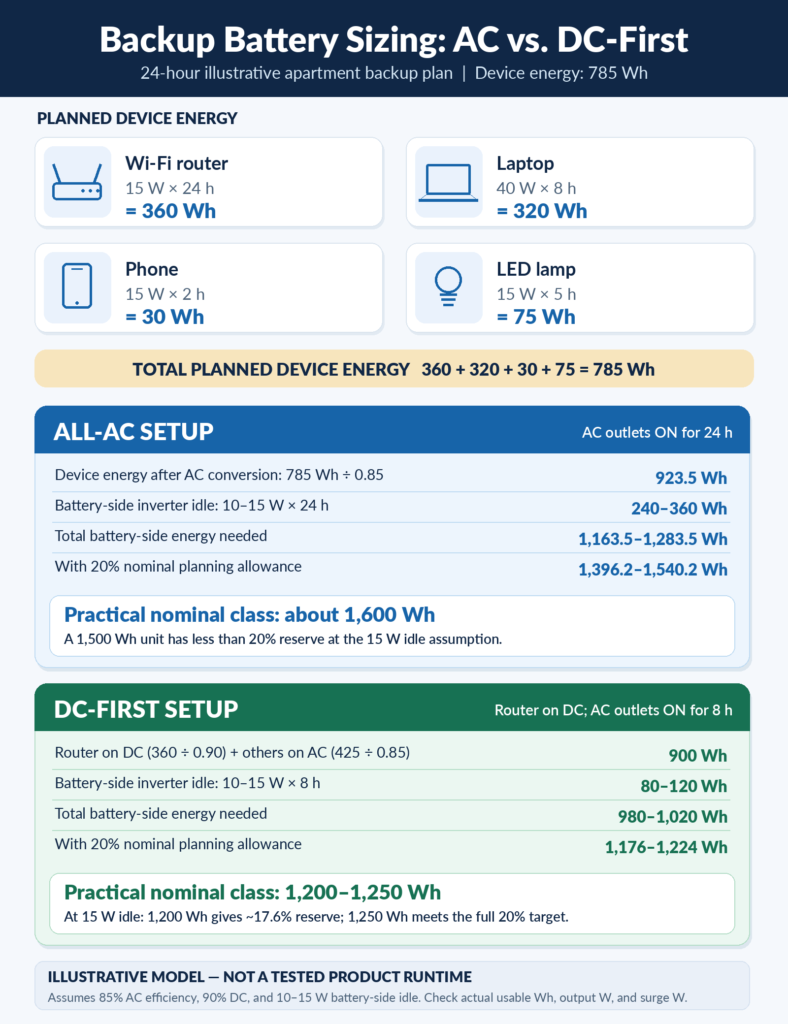
Use this example calculation as a template for adding up your household’s total energy requirements for a 24-hour period:
| Device / Appliance | Average Power (Watts) | Planned Hours of Use | Total Planned Energy (Watt-Hours) |
|---|---|---|---|
| Wi-Fi Modem / Router Setup | 15 W | 24 hours | 360 Wh |
| Laptop Workstation | 40 W | 8 hours | 320 Wh |
| Smartphone Charging | 15 W | 2 hours | 30 Wh |
| LED Floor Lamp | 15 W | 5 hours | 75 Wh |
| Device Planned Energy | — | — | 785 Wh |
Step-by-Step Sizing Comparison
- Base Device Energy (Without Inverter Idle Losses):
- Arithmetic Minimum:
- Recommended Capacity (with 20% Allowance):
- All-AC Continuous Operation (AC Inverter ON 24 Hours with 10W–15W Idle Draw):
- Total Required Battery Energy:
- Recommended Nominal Capacity (with 20% Allowance):
- Buying Decision: Running all devices continuously on AC power for 24 hours requires a power station with 1,400Wh to 1,600Wh nominal capacity (calculated battery-side energy requirement: 1,164–1,284Wh, before the planning allowance). Note that a 1,500Wh nominal unit satisfies the full 20% reserve at 10W idle (1,396Wh target) but operates with a slightly reduced planning reserve under 15W idle (1,540Wh target).
- DC-First / Switched-AC Operation (Router on Native 12V DC; AC Inverter ON 8 Hours during overlapping Workstation/Lamp use):
- Total Required Battery Energy:
- Recommended Nominal Capacity (with 20% Allowance):
- Buying Decision: Moving the router to native DC allows a power station with 1,200Wh to 1,250Wh nominal capacity (calculated battery-side energy requirement: 980–1,020Wh, before the planning allowance) to cover the full 24-hour schedule. A 1,200Wh nominal unit fully meets the 20% allowance at 10W idle (1,176Wh target) and operates with a 17.6% reserve under 15W idle (1,224Wh target).
Worksheet Template for Your Home
Copy this blank template to calculate your specific requirements:
| Device / Appliance | Average Power (Watts) | Planned Operating Hours | Total Energy (Watt-Hours) |
|---|---|---|---|
| Total Planned Energy | — | — | ____ Wh |
4. Compare Realistic Backup-Power Scenarios
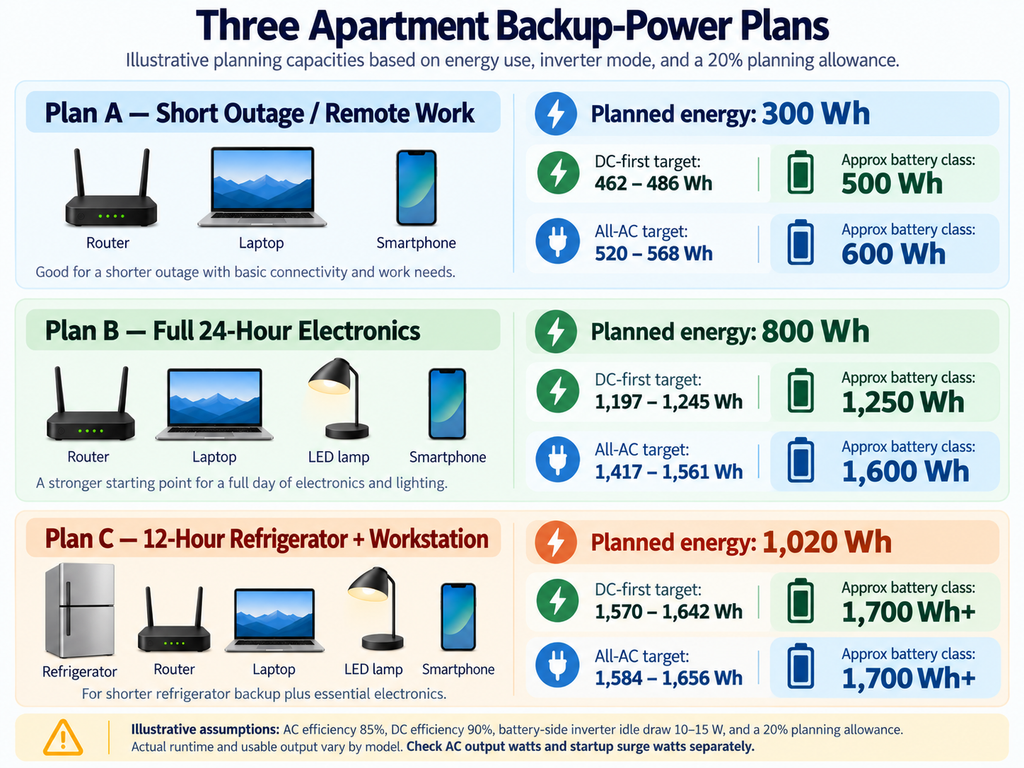
Rather than sizing batteries by room count, compare these scenarios based on explicit power plans, inverter operating modes, and preliminary energy budgets:
Scenario Energy & Capacity Summary
- Plan A: Short Outage / Remote Work (8-Hour Window)
- Device Energy: 300 Wh (Router 120Wh, Laptop 160Wh, Phone 20Wh)
- All-AC (8h Inverter ON): Total Required Battery Energy = 432.9Wh–472.9Wh Recommended Capacity: ~520Wh–570Wh Nominal
- DC-First (4h Inverter ON for Laptop): Total Required Battery Energy = 385.1Wh–405.1Wh Recommended Capacity: ~462.1Wh–486.1Wh Nominal
- Plan B: Full 24-Hour Electronics & Lighting
- Device Energy: 800 Wh (Router 360Wh, Laptop 320Wh, Lamp 90Wh, Phone 30Wh)
- All-AC (24h Inverter ON): Total Required Battery Energy = 1,181.2Wh–1,301.2Wh Recommended Capacity: ~1,417.4Wh–1,561.4Wh Nominal
- DC-First (8h Inverter ON for Overlapping Laptop/Lamp): Total Required Battery Energy = 997.6Wh–1,037.6Wh Recommended Capacity: ~1,197.2Wh–1,245.2Wh Nominal
- Plan C: 12-Hour Refrigerator Preservation + Workstation
- Device Energy: 1,020 Wh (Fridge 600Wh, Router 180Wh, Laptop 160Wh, Lamp 60Wh, Phone 20Wh)
- All-AC (12h Inverter ON): Total Required Battery Energy = 1,320.0Wh–1,380.0Wh Recommended Capacity: ~1,584.0Wh–1,656.0Wh Nominal
- DC-First (12h Inverter ON for Fridge): Total Required Battery Energy = 1,308.2Wh–1,368.2Wh Recommended Capacity: ~1,569.9Wh–1,641.9Wh Nominal
Plan A: Short Outage / Remote Work (~500Wh–600Wh Capacity Class)
- Target Schedule: 15W router for 8 hours (120Wh), 40W active laptop charging for 4 hours (160Wh), and smartphone charging (20Wh). Total device energy: 300Wh.
- Sizing Result: Under All-AC continuous operation (inverter ON for 8 hours), idle draw (10W–15W x 8h = 80Wh–120Wh) increases total battery energy required to 432.9Wh–472.9Wh. Applying the 20% planning allowance yields a recommended nominal capacity of ~520Wh to ~570Wh. Under the illustrative 85% efficiency assumption, a 400Wh nominal battery would deliver about 340Wh of active AC-device energy () before inverter idle consumption. That covers the 300Wh device-only budget but falls short once 80–120Wh of idle energy use is included. A model of 500Wh to 600Wh nominal capacity (calculated battery-side energy requirement: 433–473Wh, before the planning allowance) is recommended; a 500Wh unit covers 10W idle draw with a 15.5% reserve, while a 600Wh unit provides a 26.9% reserve under 15W idle. If the router is powered via native DC () and the AC inverter is switched ON for only 4 hours during active laptop charging (, plus 40Wh–60Wh idle draw), total battery energy required is 385.1Wh–405.1Wh, requiring a recommended nominal planning capacity of ~462.1Wh–486.1Wh (a 500Wh-class power station).
Plan B: Full 24-Hour Electronics & Lighting (1,200Wh vs 1,500Wh Class)
- Target Schedule: Router running 24 hours (360Wh), laptop workstation used for an 8-hour shift (320Wh), 15W LED lamp for 6 hours (90Wh), and smartphone charging (30Wh). Total device energy: 800Wh.
- Sizing Result: Under All-AC continuous 24-hour operation, 10W–15W idle draw adds 240Wh–360Wh, pushing total battery energy required to 1,181.2Wh–1,301.2Wh. Adding the 20% planning allowance yields ~1,417.4Wh to ~1,561.4Wh, requiring a 1,500Wh–1,600Wh class power station (calculated battery-side energy requirement: 1,181–1,301Wh, before the planning allowance). A 1,500Wh nominal unit meets the 10W idle target (1,417.4Wh) with a 27.0% reserve, while a 1,600Wh unit meets the 15W idle target (1,561.4Wh) with a 23.0% reserve. However, if a DC-First strategy is used (powering the router via 12V DC or USB-C [] and switching the AC inverter ON for 8 overlapping hours of laptop and lighting use [, plus 80Wh–120Wh idle draw]), total battery energy required drops to 997.6Wh–1,037.6Wh, and recommended nominal capacity becomes ~1,197.2Wh to ~1,245.2Wh—allowing a 1,200Wh–1,250Wh class power station (calculated battery-side energy requirement: 998–1,038Wh, before the planning allowance) to satisfy the schedule. A 1,200Wh unit provides a 20.3% reserve under 10W idle and a 15.7% reserve under 15W idle.
Plan C: 12-Hour Refrigerator Preservation + Electronics (1,600Wh–2,000Wh Capacity Class)
- Target Schedule: Refrigerator averaging 50W over 12 hours (600Wh), Wi-Fi router for 12 hours (180Wh), laptop workstation for 4 hours (160Wh), LED lamp for 4 hours (60Wh), and phone charging (20Wh). Total device energy: 1,020Wh.
- Sizing Result: Because the refrigerator requires the AC inverter to remain active for 12 hours, 10W–15W idle draw adds 120Wh–180Wh. Under All-AC operation ( active), total battery energy required is 1,320.0Wh–1,380.0Wh, yielding a recommended nominal capacity of ~1,584.0Wh to ~1,656.0Wh. Under DC-First operation (router ; AC ; plus 120Wh–180Wh idle draw), total battery energy required is 1,308.2Wh–1,368.2Wh, yielding a recommended nominal capacity of ~1,569.9Wh to ~1,641.9Wh—making a 1,600Wh–2,000Wh class power station the appropriate recommendation (calculated battery-side energy requirement: 1,308–1,368Wh, before the planning allowance). A 1,600Wh unit provides a 22.3% reserve at 10W idle and a 16.9% reserve at 15W idle; a 2,000Wh unit provides a 46.2% reserve. An illustrative 1,500Wh power station active-conversion calculation ( usable) reflects an active conversion estimate before inverter idle draw, but leaves a reduced safety margin unless router loads are moved to native DC or ambient room temperatures reduce refrigerator compressor cycle time.
- Food Preservation & Extended Outages: Do not attempt to extend battery runtime by manually toggling the refrigerator on and off on a fixed timer (such as “2 hours on, 1 hour off”). Fixed manual cycling does not establish safe internal temperatures and can lead to food spoilage. Instead, follow USDA and public health guidelines: keep refrigerator doors strictly closed (an unopened refrigerator maintains safe temperatures for approximately 4 hours without power), monitor internal temperatures with an appliance thermometer, and plan for alternative cold storage or battery recharging if the outage extends beyond your battery’s verified runtime.
5. Can the Battery Actually Start Your Refrigerator? (Continuous Output vs. Startup Surge)
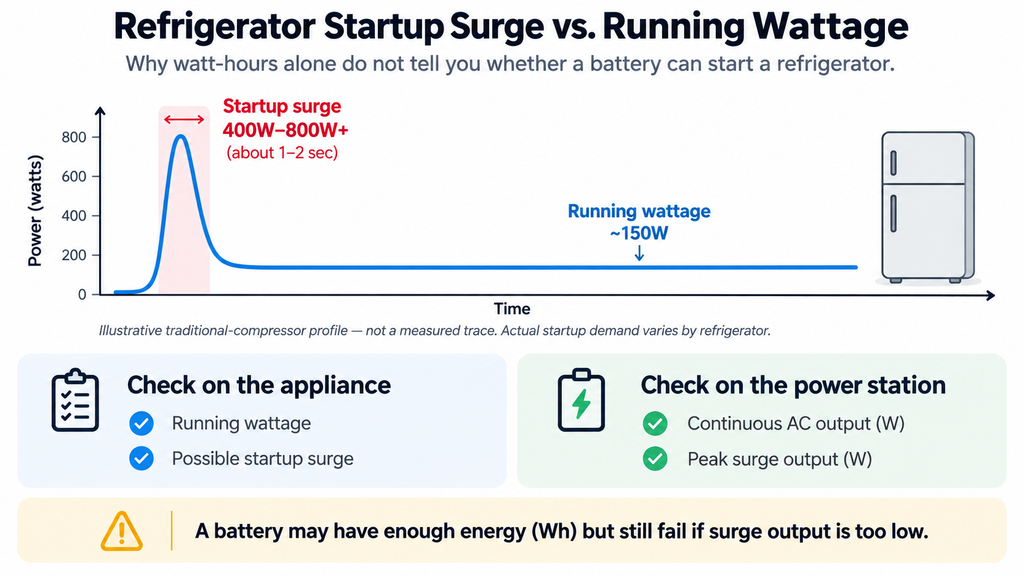
Battery energy capacity (Wh) determines how long your power station can run appliances over time, but AC output capacity (W) determines which appliances can run at all. Refrigerator backup requires verifying four distinct technical requirements:
- Stored Energy Capacity (Wh): Determines overall operating runtime over a 12-to-24 hour window.
- Continuous AC Output Rating (Watts): Must comfortably exceed the combined running wattage of all simultaneously connected appliances.
- Peak Surge Output Rating (Watts): Must equal or exceed the maximum motor compressor startup surge (motor starting inrush). Traditional single-speed refrigerator compressors drawing 150W while running require a 1-to-2 second startup pulse of 400W to 800W+ when the motor engages (though modern variable-speed inverter compressors can exhibit lower surge peaks). Note that motor startup current is specified as locked-rotor amperes (LRA) on compressor rating plates, which translates to a high momentary wattage demand.
- Physical Socket Outlets & Circuit Clearance: Must provide enough battery-backed outlets and spacing for appliance power plugs.
If a power station’s inverter surge ceiling is too low, the unit’s overload protection will trip instantly when the refrigerator compressor attempts to start—leaving the refrigerator without power even if the battery display shows 1,500Wh of remaining stored energy! Note that an appliance’s rating plate does not always disclose starting surge; check manufacturer specifications or measure startup demand with a suitable watt meter.
6. Special Requirements for Medical Devices
Medically necessary equipment—such as CPAP machines, oxygen concentrators, or home dialysis units—requires an equipment-specific emergency plan. Do not apply household backup calculations, generic consumer runtime percentages, or standard battery scenarios to life-sustaining medical equipment.
Key guidelines for medical equipment emergency planning:
- Consult Official Guidance: According to the U.S. Food and Drug Administration (FDA) emergency medical device guidelines, users should review their medical device’s emergency documentation, consult their healthcare provider, care team, or equipment manufacturer, and check with their local electric utility regarding medical notification programs.
- Utility Medical Programs: Ask your local utility whether it offers medical-needs registration or outage notification programs. Do not treat utility enrollment as a replacement for a medically appropriate backup battery and contingency plan, as registration does not guarantee uninterrupted power or priority restoration.
- CPAP Power Draw Variability: CPAP power consumption varies greatly depending on prescribed pressure settings, device model, and whether heated humidification or heated tubing is active. Turning off heated humidification reduces energy draw significantly, but altering humidification settings may affect therapy comfort; consult your healthcare provider or device manual first.
- Use Manufacturer-Approved DC Converters: Bypassing the power station’s AC inverter by using a manufacturer-approved 12V or 24V DC converter cable generally reduces internal conversion losses. Always verify that DC cables and voltage converters are officially approved by the medical device manufacturer—such as ResMed’s official CPAP battery and DC converter guidelines—for your exact model and pressure settings.
7. What to Look for in an Apartment Backup Battery
When evaluating portable power station specifications for indoor apartment use, focus on these practical criteria:
Battery Chemistry: LiFePO4 Power Station vs. NMC Units
Verify whether the unit is a LiFePO4 power station (Lithium Iron Phosphate) or uses traditional NMC (Lithium Nickel Manganese Cobalt Oxide) chemistry:
- Advertised Cycle Life: Many LiFePO4 units are advertised for 2,500 to 4,000+ full charge cycles before capacity degrades to 80%, compared to 500 to 1,000 cycles for traditional NMC chemistry. However, actual service life depends on ambient storage temperature, depth of discharge, usage patterns, and manufacturing quality.
- Thermal Behavior: LiFePO4 chemistry exhibits higher thermal stability than NMC under severe stress. Nevertheless, LiFePO4 units are still high-energy lithium-ion systems that require proper charge management, adequate cooling clearance, and operating within specified temperature limits.
Automatic Switchover (UPS / EPS Behavior)
Many portable power stations advertise EPS (Emergency Power Supply) or UPS (Uninterruptible Power Supply) functionality with transfer switchover speeds of 10 to 20 milliseconds. Independent lab testing methodology, such as CNET’s power station review standards, evaluates switchover performance under real-world loads.
Do not assume an advertised 20ms switchover speed guarantees uninterrupted operation for all desktop computers, NAS servers, or sensitive electronics. According to the Intel ATX Version 3.0 Multi Rail Desktop Platform Power Supply Design Guide (Revision 2.01), power supplies require a minimum hold-up time of 17ms (T5 + T6) at maximum continuous output; a 20ms voltage interruption may still cause sensitive desktop PCs or servers to reboot. Test non-medical workstations on the power station’s passthrough power during normal conditions to verify compatibility.
Fast AC Wall Recharging vs. Balcony Solar Limitations
While solar panel bundles are heavily marketed, relying on a solar generator for apartment balconies presents significant real-world challenges:
- Balcony & Window Constraints: Apartment balconies are frequently shaded by adjacent buildings, window glass (especially coated Low-E or multi-pane glazing) can significantly reduce the sunlight reaching a solar panel, and lease agreements or HOA rules often prohibit hanging solar panels over exterior railings. Actual output depends on glazing type, window orientation, shading, and panel placement, so indoor-window solar charging should not be assumed sufficient without measuring it.
- Fast AC Wall Recharging Priority: During unpredictable weather events, fast AC wall charging (where supported models charge from 0% to 80% in 45 to 80 minutes from a wall outlet) is far more practical. If grid power flickers back on briefly, fast wall charging allows you to replenish your battery reserve rapidly. For prolonged outages, identify alternative recharging options in advance (such as a vehicle car outlet or charging at an unaffected location).
Safety Certifications and Fan Noise
Look for power stations that carry independent safety certifications to recognized standards, such as ANSI/CAN/UL 2743 Certification Standard for Portable Power Packs. Additionally, check independent reviews for measured cooling fan noise under your intended operating load. A fan operating under 45dB is generally a helpful user preference for quiet indoor operation near sleeping quarters.
8. Indoor Safety, Placement, and Building Rules
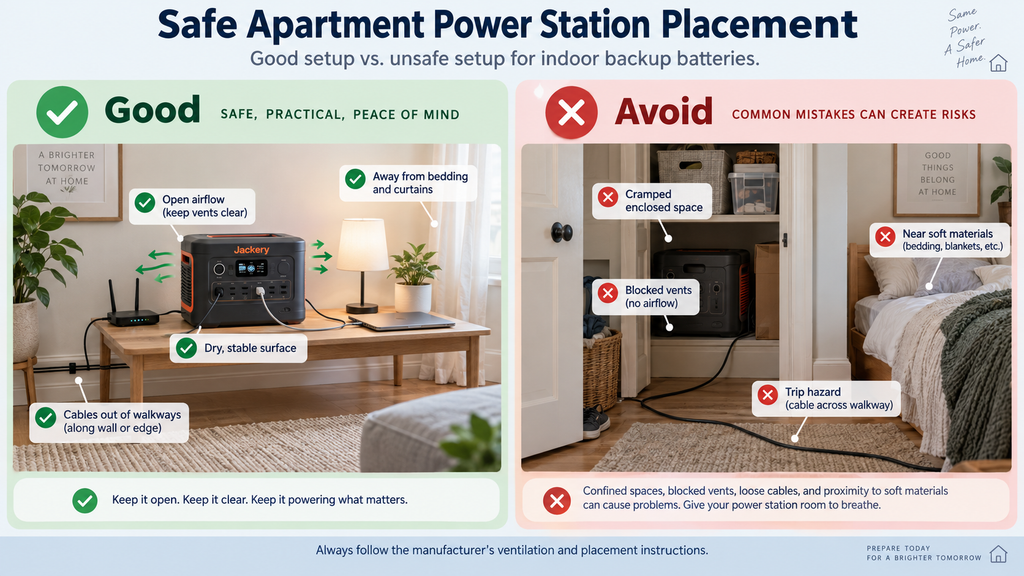
Operating an indoor power station safely in multi-unit residential buildings requires following established physical and safety boundaries:
- Strict Prohibition of Fuel-Burning Generators: Gas, diesel, or propane generators emit lethal carbon monoxide (CO) gas and must never be operated indoors, inside garages, or on open or enclosed apartment balconies. As outlined in the Government of Canada’s power outage safety guide, fuel-burning generators must operate outdoors at least 6 meters (20 feet) away from buildings, with exhaust directed away from doors, windows, and openings. Note that lease agreements, condo bylaws, and local regulations govern equipment use on private property.
- Never Use Indoor Flame Devices for Heating: Never attempt to heat an apartment using charcoal grills, propane camping stoves, or open-flame devices during cold-weather power blackouts. Layer clothing and use thermal blankets for warmth.
- Never Backfeed Building Outlets: Never attempt to connect a portable power station’s AC output directly into a household wall outlet using a custom “double-male” extension cord. Backfeeding energizes building wiring, creates fatal electrocution hazards for utility workers restoring lines, and poses extreme fire hazards. Plug appliances directly into the power station’s outlets.
- Ventilation Clearance & Refrigerator Cord Safety: Keep air intakes and exhaust vents unobstructed, and follow the manufacturer’s stated ventilation clearances. Never operate power stations inside tightly sealed closets or under soft bedding. For refrigerators, follow the appliance manufacturer’s electrical instructions: plug the appliance directly into an appropriately rated power-station outlet when permitted, and do not use an extension cord if the refrigerator’s instructions prohibit one.
- Standby Charging & Storage: Follow the specific manufacturer’s instructions for standby charge levels and storage maintenance. While some manufacturers recommend storing batteries at 50% to 80% state of charge for prolonged storage, choose a standby charge level that balances your model’s battery longevity with the level of emergency readiness you require. Perform periodic inspection cycles as outlined in your user manual.
9. Final Decision Checklist
Follow this summary checklist before selecting your backup power equipment:
- [ ] Audit Device Loads: List essential appliances, noting time-averaged running wattages, simultaneous continuous loads, and compressor startup surge requirements.
- [ ] Calculate Required Capacity (Wh): For each device, calculate scheduled energy (Wh = watts × planned hours). Divide total AC-device energy (Wh) by 0.85 and total DC-device energy (Wh) by 0.90; add battery-side inverter idle energy (10–15 W × AC-on hours), then multiply the total by 1.20 for the illustrative nominal-capacity planning target.
- [ ] Evaluate DC-First Operation: Consider powering continuous low-wattage devices (like Wi-Fi routers) via native 12V DC, USB-C PD, or a dedicated mini DC UPS to eliminate continuous AC inverter idle loss.
- [ ] Verify Continuous and Surge Output (W): Ensure the power station’s continuous AC output rating handles your simultaneous loads and its peak surge ceiling accommodates refrigerator compressor startup.
- [ ] Check Physical Handling: Verify the unit’s weight, dimensions, handles, and storage placement for safe transport and setup in your living space.
- [ ] Perform a Setup Test: Unpack your unit upon arrival, connect your essential appliances, verify cord routing, and conduct a representative-load runtime test before an actual blackout occurs. (Do not experimentally disconnect or test health-critical medical equipment).
- [ ] Establish a Recharging Contingency: Plan how you will replenish the battery if an outage extends beyond its initial charge (such as AC wall charging during grid restoration or vehicle charging).
For specific appliance load testing, see our dedicated guides on refrigerator battery backup strategies, router UPS configurations, phone power bank charging, and winter outage warmth planning.