
When an apartment or condo loses electricity, standard emergency advice often falls short. Many backup-power options intended for detached homes—such as fuel-powered generators, panel transfer switches, or large outdoor fuel reserves—are unsuitable for apartments because of limited space, lease or condo restrictions, noise, and carbon monoxide safety hazards.
Managing the first 24 hours of an apartment blackout does not require thousands of dollars in survival gear or an oversized battery hub taking up half a closet. Instead, it relies on taking the right steps in the right sequence: starting with a quick safety check, keeping a headlamp or flashlight available, conserving mobile phone battery, preserving refrigerated food, and managing building-specific challenges such as dark stairwells, electronic key fob doors, and water pressure drops.
This guide provides a practical, apartment-focused strategy for navigating your first 24 hours off the grid, selecting essential emergency supplies for a power outage, assembling a compact power outage emergency kit, and knowing when it is safe to stay versus when you should relocate.
Quick Answer: What to Do When Your Apartment Loses Power
If your apartment just lost power, follow this high-level response sequence:
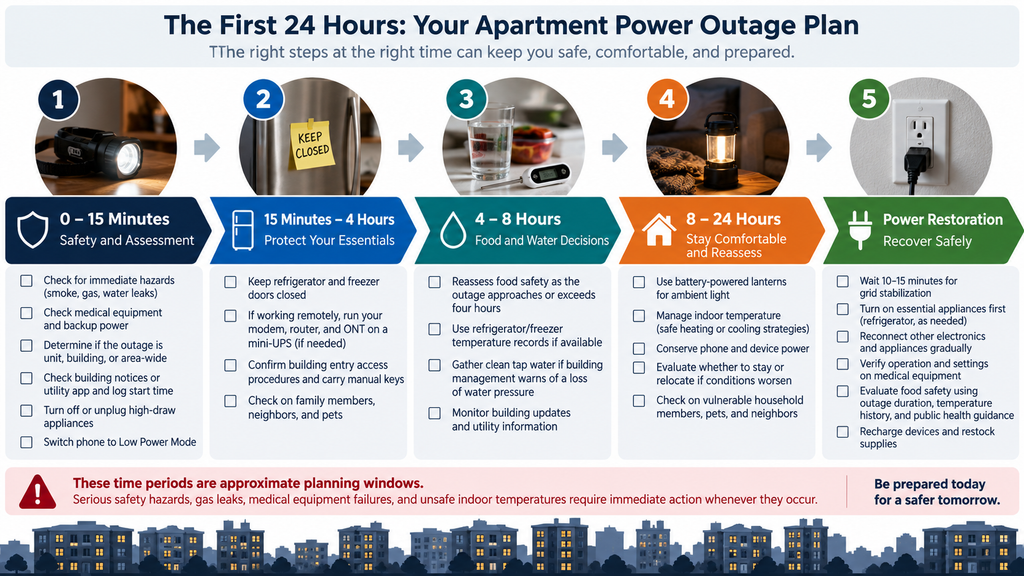
- First 15 Minutes: Start with a quick safety check for immediate hazards. If you smell natural gas or suspect a leak, evacuate immediately without operating switches or phones. Otherwise, check electricity-dependent medical devices, put on an LED headlamp for hands-free light, check building notices or local utility apps, switch your phone to Low Power Mode, and turn off or unplug high-draw or unattended heating and cooking appliances.
- 15 Minutes to 4 Hours: Keep refrigerator and freezer doors closed. If working remotely, verify that your mini-UPS or battery backup has compatible outputs and sufficient capacity for the modem, router, or fibre Optical Network Terminal (ONT) devices you actually need. Confirm building entry access procedures and carry manual override keys.
- Hours 4 to 8: Reassess food safety as the outage approaches or exceeds four hours. Gather clean tap water if building management warns of an impending loss of water pressure.
- Hours 8 to 24: Deploy battery-powered lanterns or glow sticks for ambient light. Manage indoor temperatures safely (conserving heat in a single interior room during winter; using low-draw USB fans when helpful in summer). Evaluate whether to stay or relocate if environmental or health conditions worsen.
- Power Restoration: Allow a 10 to 15-minute grid stabilization interval before turning back on nonessential electronics or heavy appliances. Verify operation and settings on medical equipment, and evaluate food safety using outage duration, temperature history, and public health guidelines before consuming perishables.
Note: These time periods are approximate planning windows. Serious safety hazards, gas leaks, medical equipment failures, and unsafe indoor temperatures require immediate action whenever they occur.
Jump down to Section 9 for a printable one-page checklist summarizing all steps.
1. The First 15 Minutes: Quick Safety Check and Outage Assessment
When grid power drops, execute a quick safety check before reaching for gear.
Step 1: Start with a Quick Safety Check
Before addressing lighting or food, verify that your immediate living environment is secure:
- Gas Leak Emergency: If you smell natural gas or suspect a leak, leave the area immediately. Do not operate electrical switches, unplug equipment, or use a landline or mobile phone inside or near the suspected leak, as electrical arcs can ignite gas. Contact emergency services (911) or your gas utility from a safe location outside (Enbridge Gas Safety Protocol).
- In-Unit Hazards: Check for smoke, burning odors, sparking outlets, or water pooling near electrical appliances.
- Electricity-Dependent Medical Equipment: If anyone in your household relies on medical devices powered by electricity (such as an oxygen concentrator, CPAP, home dialysis unit, or motorized mobility equipment), immediately check device backup battery levels. If power is required for life-sustaining equipment and backup capacity is limited or unknown, initiate your prearranged medical contingency plan right away rather than waiting for batteries to deplete (FDA Medical Devices & Disasters Guidance).
Step 2: Determine Outage Scope and Check Building Management
Find out whether the disruption is limited to your individual unit, your building, or the broader neighborhood:
- Unit vs. Building: Look out your windows at streetlights or check hallway lighting.
- Internal Breaker Panel: If neighboring units have power but yours is dark, safely inspect your internal circuit breaker box with dry hands while standing on a dry floor. Reset a tripped breaker once; if it trips again immediately or if you notice scorch marks, do not attempt repeated resets.
- Building Notices: Check resident portals, bulletin boards, or contact building management/superintendent to confirm if the issue is an internal building fault (such as a main transformer failure) or a municipal blackout.
- Report to Utility: If the blackout extends beyond your building, report it via your electric utility’s mobile app or emergency phone line (Toronto Hydro Emergency Guide). Log the exact start time on your phone.
Step 3: Prevent Surge Damage and Conserve Phone Power
- Turn Off / Unplug Unattended Appliances: Switch off or unplug appliances that could pose a fire or surge hazard if power returns unexpectedly—including electric stoves, ovens, space heaters, irons, desktop computers, and televisions. Leave one low-draw lamp switched on so you have a clear visual signal when power returns. Essential refrigeration devices can remain plugged in.
- Conserve Cellular Battery: Switch your mobile phone to Low Power Mode. Lower screen brightness, close background applications, and avoid video streaming. Preserve battery capacity for emergency alerts, utility tracking, and essential communication.
Step 4: Deploy Safe, Hands-Free Lighting
Avoid reaching for open-flame candles. In compact apartment layouts, candles represent a major fire hazard if tipped over by pets, drafty hallways, or accidental contact.
- Put on an LED Headlamp: Hands-free lighting keeps both hands available for holding stair handrails, managing keys, or handling supplies.
- Battery-Backup LED Bulbs: If you use battery-backup LED lightbulbs in standard lamps, verify their operation. Depending on the model, some switch on automatically during grid failure, while others require toggling the lamp switch off and on.
2. 15 Minutes to 4 Hours: Protect Your Essentials
During the early hours of an outage, focus on protecting food, preserving work connections, and understanding building system behavior.
Keep the Refrigerator Door Closed
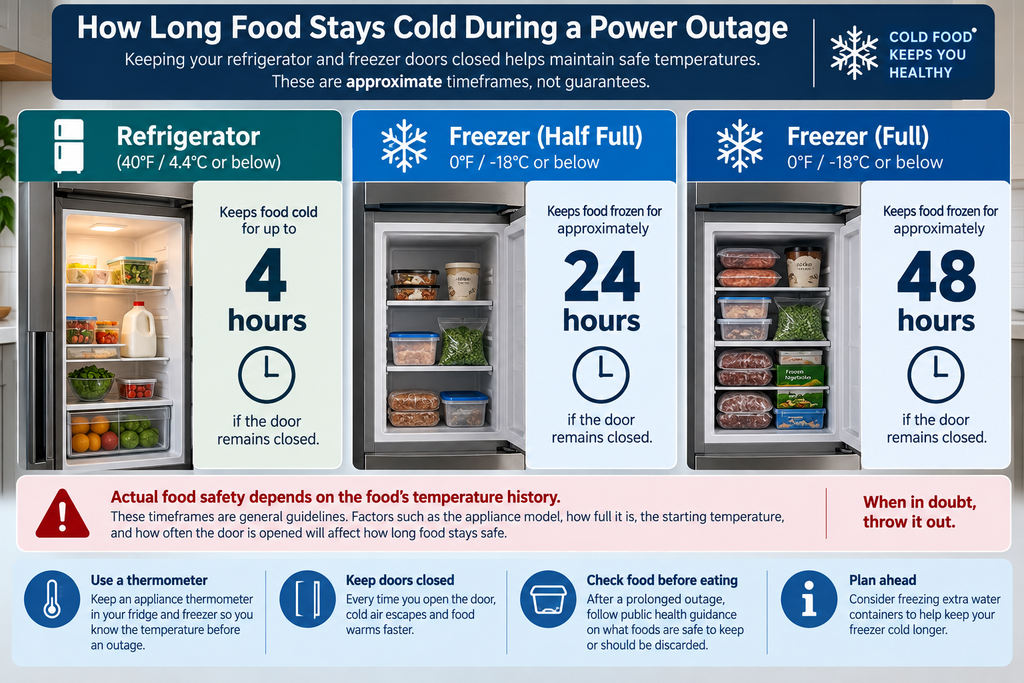
An unopened household refrigerator maintains a food-safe temperature (under 40°F / 4.4°C) for up to 4 hours.
- Avoid Unnecessary Opening: Every door opening releases cold air and accelerates internal warming.
- Visual Reminder: Applying a strip of brightly colored painter’s tape across the door seam serves as an effective visual reminder for family members and roommates to keep the door closed.
Keeping Your Work Equipment Running
If you work remotely, preserving internet connectivity during a localized power disruption requires understanding system dependencies:
- Local Power vs. Provider Network: If your internet connection uses a separate modem, Wi-Fi router, or fibre Optical Network Terminal (ONT), ensure your battery backup has compatible DC/AC outputs and sufficient capacity for all necessary devices. A small dedicated uninterruptible power supply (UPS) or mini-DC battery bank can keep internet equipment running for an estimated 3 to 6 hours (as an illustrative example dependent on actual load and battery capacity). However, if the blackout affects your internet provider’s neighborhood distribution node, local Wi-Fi power will not restore internet access.
- Laptop Power Management: Dim your laptop display, close non-essential background applications, and use your smartphone’s cellular hotspot if broadband goes offline.
*For setup diagrams and runtime calculations, read our dedicated guide on How to Power Your Wi-Fi Router During a Blackout.*
Building Infrastructure and Access Realities
Multi-unit residential buildings depend heavily on electrical power for shared systems:
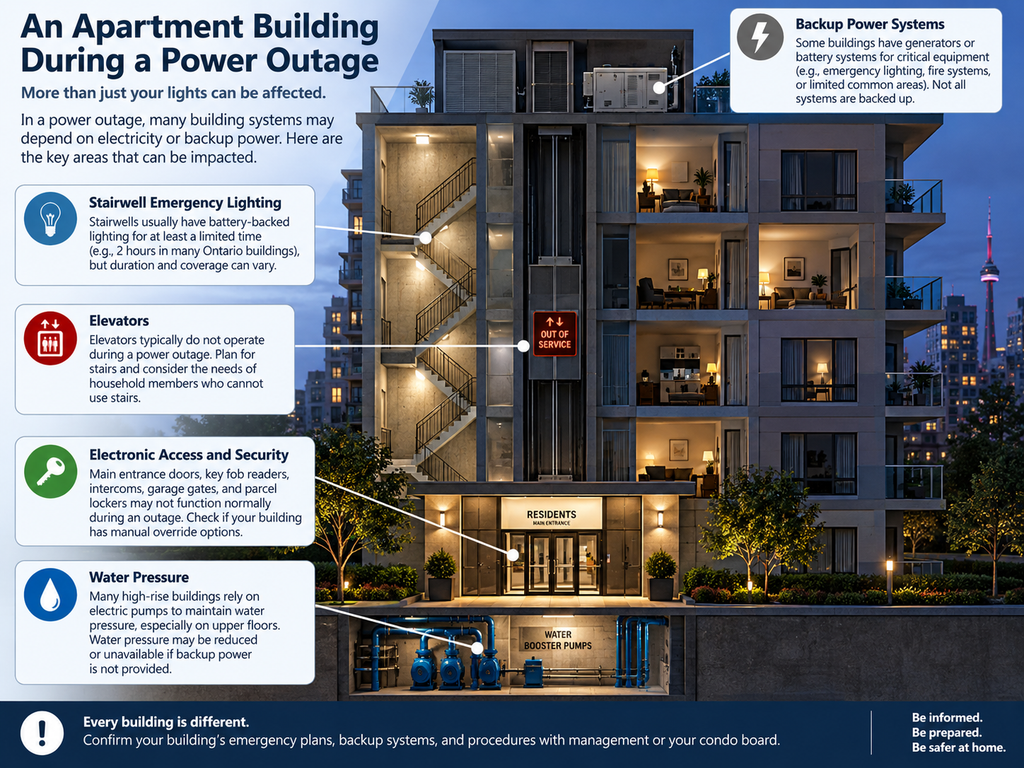
- Electronic Key Fobs and Gates: Electric strike doors, garage gates, and fob readers may be locked or operate differently without power. Ask building management in advance how manual access is handled if fob readers fail, and ensure you carry any issued mechanical override keys when stepping into the hallway.
- Stairwell Emergency Lighting: Emergency-lighting rules vary by building and jurisdiction; ask management in advance how long your building’s backup emergency lighting is expected to operate. Residents should never assume stairwell lights will remain powered throughout an extended blackout. Always carry a headlamp or pocket flashlight when navigating stairwells.
Individualized Accessibility and Medical Assistance Plans
If a member of your household has mobility limitations, temperature-sensitive medication needs, or relies on electricity-dependent medical equipment:
- Prearranged Evacuation / Assistance Plan: Develop an individualized assistance plan in advance with building management, care providers, and a trusted support person. Identify accessible evacuation routes, backup locations, and clear methods to request help when elevators are out of service (Government of Canada Emergency Preparedness for Persons with Disabilities).
- Refrigerated Medications: If anyone relies on temperature-sensitive medications (such as insulin or specialized biologics), keep a small insulated cooler bag and gel ice packs in your kit to maintain safe storage temperatures if the outage exceeds 4 hours.
- Medical Device Power Verification: Verify that medical backup battery systems are tested, properly sized, and rated for your specific clinical device. Do not rely on generic consumer power banks for life-critical medical equipment. If expected outage duration exceeds backup runtime, initiate relocation or contact emergency services early.
- Strict Fuel Boundary: Fuel-burning combustion generators must never be operated inside an apartment, in hallways, or on open balconies due to lethal carbon monoxide risks.
3. Hours 4 to 8: Decisions on Food, Water, and Building Access
As the outage crosses the four-hour mark, active decisions become necessary regarding perishables, water supplies, and remaining in your unit.
| Storage Location | Door Condition | Approximate Time with Doors Closed | Primary Action |
|---|---|---|---|
| Refrigerator | Unopened | Up to 4 Hours | Keep closed; reassess food safety as outage approaches or exceeds 4 hours |
| Freezer (Half-Full) | Unopened | Approximately 24 Hours | Keep closed; check for ice crystals upon power restoration |
| Freezer (Full) | Unopened | Approximately 48 Hours | Keep closed; check for ice crystals upon power restoration |
Food Safety Decisions as Outages Exceed 4 Hours
An unopened refrigerator generally keeps food cold for about four hours during a power outage. After that, the risk of perishable food warming above 40°F (4.4°C) increases:
- Public Health Discard Rules: Authoritative public health guidance from the FDA, USDA, and Health Canada states that perishable items—such as raw meats, poultry, dairy, soft cheeses, cooked leftovers, and egg products—known to have been above 40°F (4.4°C) for 2 hours or more must be discarded.
- Evaluating Temperature History: An unopened fridge provides roughly 4 hours of thermal protection under typical room conditions. However, a single spot reading cannot reconstruct temperature history over an extended outage. Where temperature history cannot be established and the outage exceeds the 4-hour window, follow conservative public health discard guidelines unless an ice-filled cooler or reliable cold source protected them.
- Appliance vs. Food Thermometers: An appliance thermometer installed inside your fridge/freezer measures ambient air temperature to help you track conditions during an outage. A separate food stem thermometer is used to check that internal food temperatures reach safe thermal thresholds when cooking after power is restored.
- Freezer Evaluation: An unopened full freezer holds safe temperatures for approximately 48 hours (half-full for ~24 hours). When power returns, inspect frozen food for ice crystals or internal temperatures at or below 40°F to determine if items can be safely refrozen or prepared.
*For detailed appliance wattage and food preservation strategies, see Apartment Refrigerator Power & Food Protection.*
If your building experiences frequent or prolonged blackouts, passive cooling alone may not be enough to protect your groceries. Sizing an indoor-safe battery to keep your compressor running requires matching your fridge’s startup surge and continuous wattage against the battery’s usable capacity. ***To calculate your fridge’s real-world power draw and determine if a backup battery makes financial sense for your unit, read Refrigerator Battery Backup: Is It Worth It for an Apartment?***
Water Availability and Sanitation Rules
Water disruptions in multi-unit buildings depend on the specific infrastructure component affected:
- Booster Pump Pressure Loss: High-rise buildings use electric booster pumps to deliver water to upper floors. If booster pumps lose power, upper floors may experience a drop in water pressure even if municipal water remains clean and safe. If building management or local authorities warn of impending pressure loss, gather clean tap water in clean containers while the supply is still available. Health Canada recommends a baseline of 2 Liters of drinking water per person per day, with an additional 2 Liters per person per day for cooking and cleaning (our general planning rule of 1 gallon / 3.8 L per person per day comfortably covers drinking and minimal hygiene).
- Plumbing Pressure vs. Sewer Function: A loss of tap pressure does not mean the building sewer system has failed. If the building drainage system remains clear and municipal authorities have not placed restrictions on sewer use, you can manually flush toilets by pouring a bucket of stored water directly into the toilet bowl.
- Confirmed Sewer / Drainage Failure: Reserve emergency bucket toilet procedures (using heavy-duty garbage bag liners and absorbent material) strictly for situations where municipal wastewater infrastructure or building drainage has failed. Follow local public health instructions.
4. Hours 8 to 24: Overnight Resilience and Relocation Decisions
Entering the overnight phase requires deploying energy-efficient lighting, managing indoor room temperatures safely, and evaluating whether your apartment remains habitable.
Battery-Powered Overnight Lighting
- Battery-Powered LED Lanterns: Switch from directional headlamps to battery-powered lanterns set to a low lumen output to provide soft, ambient room illumination.
- Chemical Glow Sticks: Place glow sticks in bathrooms or entry hallways to provide safe, low-cost nightlighting without consuming battery power.
- Avoid Overnight Candles: Unattended or tipped candles represent a serious fire hazard in multi-unit buildings. Use battery-powered LED lanterns and headlamps instead.
*For complete equipment placement and safety guidelines, see How to Light an Apartment Safely During a Power Outage.*
Indoor Climate Control in Small Spaces
Urban apartments lose or trap heat rapidly depending on building insulation, floor height, and solar exposure.
Winter Outages: Winter Power Outage Survival Kit & Room Containment
Instead of attempting to keep an entire apartment warm, shrink your living footprint:
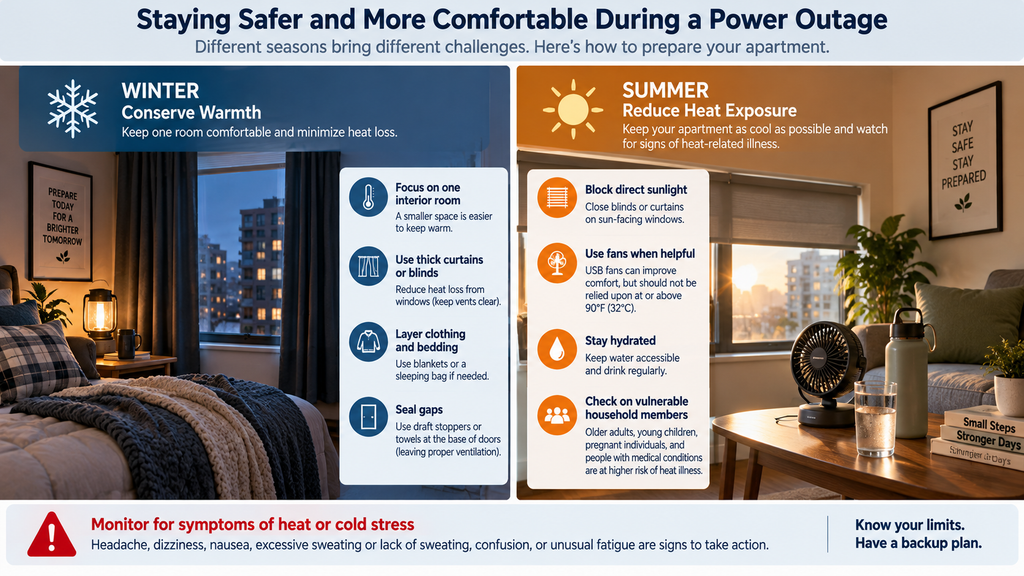
- Create a Single Warm Zone: Select a small interior room (such as a bedroom) for household members to gather in.
- Doorway Drapes: Hang heavy thermal blankets or fleece sheets over doorways and windows to trap body heat inside the room. Note that the World Health Organization (WHO) identifies 18°C (64°F) as a general minimum indoor threshold for health, with higher temperatures recommended for vulnerable groups.
- Safety Boundaries: Do not cover ventilation openings, fresh air intakes, smoke alarms, carbon monoxide detectors, or exit doors with drapes. Never operate gas camping stoves, charcoal grills, or unvented fuel heaters inside an apartment; carbon monoxide (CO) accumulation is odorless, invisible, and fatal.
Summer Outages: Targeted Airflow and Heat Cautions
- Low-Draw USB Fans: Run small USB desk fans connected to portable phone power banks. A standard 10,000 mAh power bank can operate a low-wattage USB fan for 6 to 10 hours depending on fan speed and conversion efficiency.
- When Fans Are Not Enough (CDC & Health Canada Heat Guidance): Fans can improve comfort in moderate heat. However, according to public health guidelines from the CDC, when indoor temperatures reach or exceed 90°F (32°C), blowing hot air across the body does not prevent heat-related illness and can accelerate heat stress. Health Canada recommends an upper indoor guidance threshold of 26°C (79°F) for adults aged 60+, cautioning against sustained indoor heat exposure. Do not rely solely on fans when indoor temperatures approach 90°F; evaluate heat symptoms, humidity, and individual vulnerability, and arrange access to air-conditioned shelter or cooling centers well before extreme indoor conditions develop.
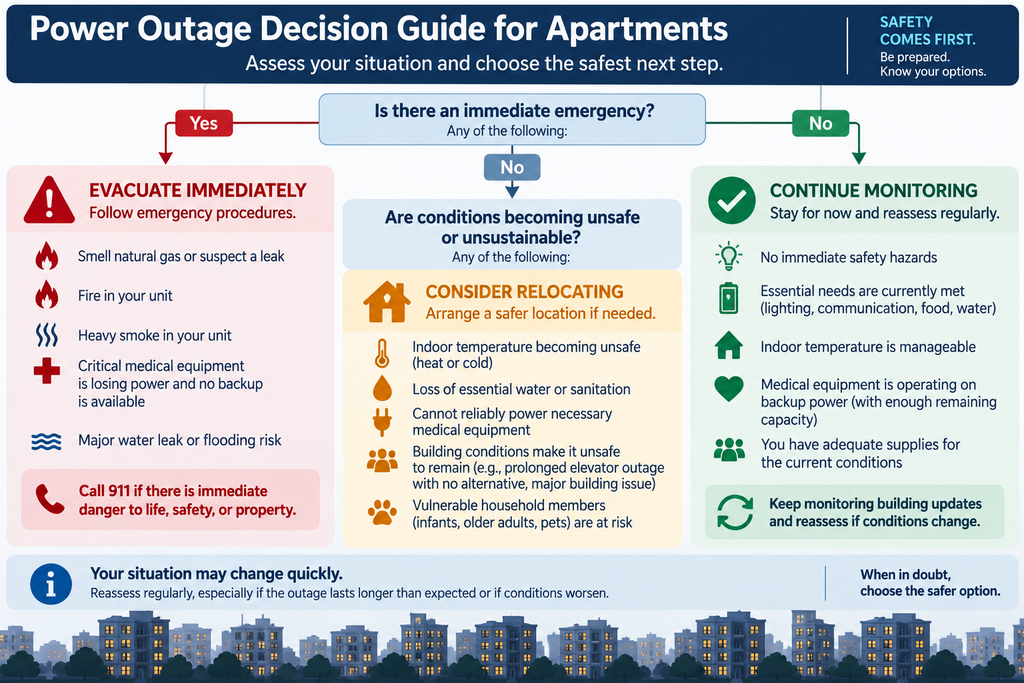
Decision Matrix: When to Stay vs. When to Relocate / Seek Help
While remaining in your apartment is usually the safest option, certain hazard triggers require immediate action or relocation at any stage of an outage:
| Hazard Trigger / Condition | Recommended Action | Safety & Communication Protocol |
|---|---|---|
| Suspected Natural Gas Leak | Evacuate immediately | Do not operate electrical switches, appliances, or phones near leak. Contact 911 / gas utility from safe outside location (Enbridge Gas Safety Protocol). |
| In-Unit Fire or Heavy Smoke | Evacuate immediately if safe route exists | Use stairwells; never use elevators. Close doors behind you. Do not enter a smoke-filled route. |
| Building Fire Elsewhere / Corridor Smoke | Follow building fire safety plan | If corridor is smoke-filled or route blocked, shelter in unit per City of Toronto High-Rise Fire Guidance. Call 911, state unit/floor, and seal door seams with wet towels. |
| Unsafe Indoor Heat & High Humidity | Relocate to cooling center / friend | Do not rely on fans to prevent heat illness when indoor temp approaches or exceeds 90°F (32°C); seek safer cooling based on exposure, symptoms, humidity, and vulnerability. |
| Sustained Indoor Cold | Relocate to warm shelter / hotel | Conserve heat in a single room first; relocate if safe room temperature cannot be maintained. |
| Medical Power Backup Depletion | Initiate medical relocation plan | Contact emergency services or care provider before backup battery power expires. |
| Loss of Clean Water / Sewer Failure | Access municipal water / relocate | Follow local boil-water advisories; relocate if sanitation cannot be maintained. |
5. When Power Returns: The Recovery Checklist
When grid electricity is restored, follow these steps to safely bring your household systems back online:
- Allow Grid Stabilization Interval: Utility providers (such as Toronto Hydro) recommend waiting 10 to 15 minutes after main grid power returns before turning on nonessential heavy appliances. This gives the local distribution network time to stabilize.
- Verify Refrigeration and Medical Equipment: Reconnect or verify operation of essential appliances. Refrigerators and freezers left plugged in will generally resume operation automatically; assess food safety using outage duration, available temperature history, and public health discard rules before consuming perishables. For electricity-dependent medical equipment, follow manufacturer and clinical guidelines to verify device operation, settings, alarms, and power source (FDA Medical Devices Guidance).
- Gradual Appliance Reconnection: Turn on nonessential electronics, heating/cooling equipment, and computers gradually over the following 30 minutes to avoid tripping internal circuit breakers.
- Recharge Emergency Equipment: Inspect and recharge phone power banks, LED headlamps, battery lanterns, and portable power stations according to their operating and storage instructions.
6. Power Outage Essentials: The Minimal Apartment Kit
Selecting the right emergency supplies for a power outage in a rental unit or condo requires balancing immediate utility against tight floor plans. Unlike a heavy suburban or rural power outage survival kit that relies on outdoor fuel stoves or bulk gear, a compact blackout emergency kit prioritizes indoor safety, space efficiency, and multi-device portability.
The following power outage supplies list categorizes equipment by priority level, key function, and apartment-friendly solutions:
| Priority Category | Gear Type | Key Function | Recommended Solution |
|---|---|---|---|
| Essential | Hands-Free Lighting | Safe navigation in total darkness | LED headlamps (with fresh AAA or rechargeable batteries) |
| Phone Power Banks | Keeps mobile communication live | 10,000–20,000 mAh portable USB power banks | |
| Water & Food Prep | Hydration and safety checks | 1 gal/person/day drinking water, no-cook food, manual can opener, food stem thermometer | |
| Local News & Radio | Local emergency updates | Battery-powered or hand-crank AM/FM radio (WeatherCAN app / local broadcast; NOAA for U.S.) | |
| Essential Documents | Contacts & medical records | Printed emergency numbers, copies of prescriptions, medical assistance plan | |
| Household Dependents | Pets & infants | Extra food, water, bowls, leash, baby formula, wipes | |
| Situational | Small Router UPS | Home-office Wi-Fi continuity | 40–100 Wh mini-UPS or DC converter cable paired with a compatible battery source |
| Climate Adaptations | Personal heating/cooling in small rooms | Small USB desk fans, heavy thermal blankets, Mylar blankets | |
| Extended Power Reserve | Multi-device backup for long blips | Compact 200–500 Wh portable battery station | |
| Sanitation Reserve | Emergency waste containment | Heavy-duty garbage liners & bucket (sewer system failure only) | |
| Unnecessary / Overbuying | Oversized Battery Hubs | 80+ lb power stations for light loads | Difficult on stairwells; excessive purchase for short blips |
| Unsafe Practices | Indoor Gas Generators | Extreme Carbon Monoxide hazard | Do not use indoors, on balconies, or in hallways |
| Open Candles | Serious fire hazard in multi-unit buildings | Replace with safe battery-powered LED lanterns and headlamps |
Modular Kit Layout for Small Spaces
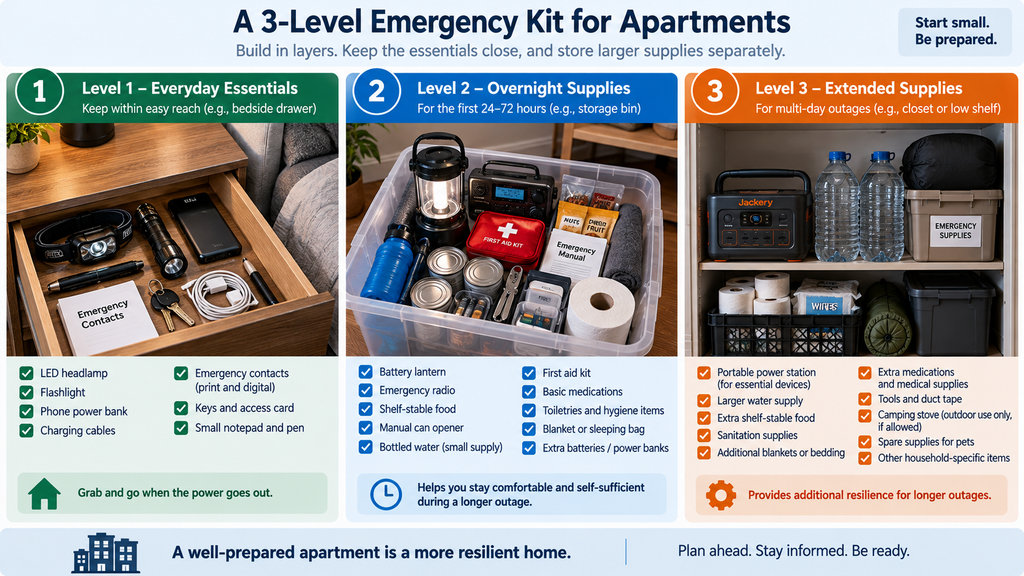
To avoid overspending or creating unmanageable storage weight, structure your blackout kit into modular layers:
- Level 1 (2–4 Hour Blip Drawer Kit): Kept immediately reachable in a hallway or nightstand drawer. Contains an LED headlamp, charged 10,000 mAh phone power bank, flashlight, building keys, and printed emergency contacts.
- Level 2 (Overnight Closet Tote): Stored safely in a single 10-gallon plastic container on an accessible entry closet shelf. Contains battery-powered LED lanterns, mini router UPS, manual can opener, shelf-stable food, food stem thermometer, appliance thermometer, pet/dependent basics, and an AM/FM emergency radio.
- Level 3 (Extended Supplies Reserve Tier): Stored separately to manage weight. Contains a compact 200–500 Wh portable power station, a 3-day water supply (e.g., 6 gallons for two people at 1 gal/person/day), and emergency sanitation supplies.
7. How Much Backup Battery Capacity Do You Really Need?
Selecting backup battery capacity for an apartment comes down to understanding your actual watt-hour requirements without purchasing heavy, expensive equipment that you cannot easily store or transport.
Understanding Electrical Units: Watts vs. Watt-Hours
To size battery backup accurately, separate instantaneous power demand from total energy stored:
- Watts (W): The rate at which an appliance consumes energy right now. (Example: A laptop charger may be rated for 65 W maximum output, though actual power draw varies dynamically based on workload and battery charging state).
- Watt-hours (Wh): The total energy stored in a battery or consumed over time. (Example: Running a 25 Watt fan for 10 hours consumes 25 W × 10 h = 250 Watt-hours).
Battery Backups That Can Be Used Indoors
Reputable battery power stations, mini-UPS devices, and portable phone banks are appropriate indoor alternatives to fuel-powered generators because they produce zero combustion exhaust or carbon monoxide. However, indoor battery equipment still requires proper handling: charge units on hard surfaces, ensure cooling fans have unobstructed ventilation, and inspect battery cells for swelling or damage per guidelines from the Electrical Safety Foundation International (ESFI). The primary safety rule for renters is never backfeed electricity into household wall receptacles, which can energize building wiring and pose fatal risks to utility lineworkers.
Estimating Runtime (Illustrative Calculation)
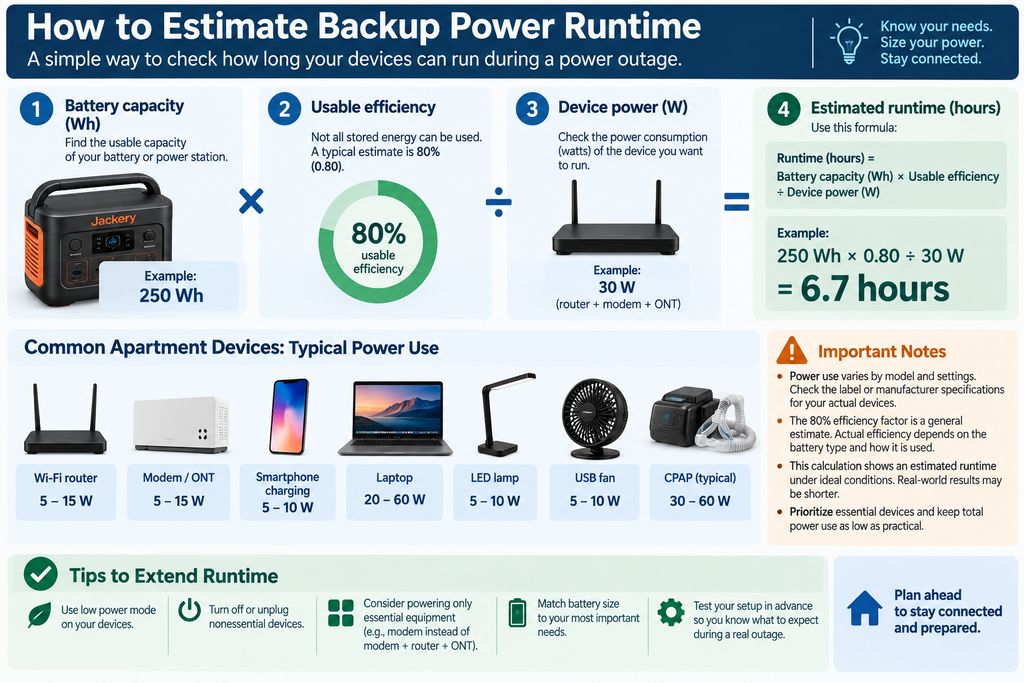
To estimate how long a battery will power a specific device, use this simple planning formula:
Estimated Runtime (Hours) = [Battery Capacity (Wh) × Usable Efficiency Fraction] ÷ Device Load (Watts)
Note: Inverter conversion losses, low-power efficiency curves, and idle power consumption reduce usable capacity. Using an illustrative 0.80 efficiency fraction provides a realistic planning estimate, not a guaranteed runtime.
Example Calculation:
If you power a 30 Watt combined load (a modem, router, and LED desk lamp) using a 250 Wh portable power station:
Runtime = (250 Wh × 0.80) ÷ 30 W = 200 Wh ÷ 30 W ≈ 6.7 Hours
*For step-by-step sizing worksheets and exact device wattage charts, read Sizing Portable Batteries for Apartment Backup.*
8. Storage, Cable Organization, and Maintenance
Emergency gear is useless if your power outage supplies cannot be located in total darkness or if idle battery corrosion has ruined the equipment.
Accessible Storage and Cable Management
- Split Storage Setup: Keep your Level 1 drawer kit immediately reachable near your entry or bed. Store your Level 2 closet tote on an accessible shelf. Avoid packing several days of water and heavy power stations into a single unmanageable container.
- Cable Pouches: Keep charging cables, wall adapters, and DC cords inside a labeled zip-top pouch stored directly inside your tote.
Safe Battery Maintenance
- Prevent Alkaline Corrosion: Store disposable AA and AAA batteries in their original packaging or a dedicated organizer. Do not leave disposable batteries installed inside flashlights during long-term storage to prevent leakage and contact corrosion.
- Rechargeable Lithium Health: Follow manufacturer storage and charge guidelines. As a general practice, inspect and top off portable phone power banks and lithium power stations every 6 months to maintain battery cell health.
9. Printable Power Outage Emergency Kit Checklist
Use this consolidated power outage emergency kit checklist as a step-by-step operational guide before, during, and after a blackout. (A dedicated one-page PDF version optimized for printing is available for download in our resource library).
Pre-Event Preparation
- Assemble Level 1 Drawer Kit (Headlamp, 10,000 mAh Power Bank, Keys, Contacts).
- Assemble Level 2 Closet Tote (Lanterns, Router UPS, Food, Stem & Appliance Thermometers).
- Save electric utility emergency phone number and outage app on phone.
- Confirm manual entry keys and building access procedures with management.
- Establish prearranged assistance / evacuation plan if household members have mobility or electricity-dependent medical needs.
First 15 Minutes: Safety & Assessment
- Perform immediate safety check (gas leak, smoke, water pooling, medical gear).
- If gas leak is suspected: Leave immediately; do not operate electrical switches or phones until safely outside; call 911 / gas utility from a safe location outside.
- Put on LED headlamp for safe, hands-free lighting.
- Check if blackout is unit-specific (breaker box) or building-wide.
- Check building notices / report blackout to electric utility.
- Turn off or unplug nonessential heating, cooking, and electronic gear.
- Switch mobile phone to Low Power Mode.
15 Minutes to 4 Hours: Protecting Essentials
- Keep refrigerator and freezer doors closed.
- Run modem, router, and ONT on mini-UPS if working remotely (verify output compatibility).
- Carry flashlight/headlamp when stepping into stairwells or hallways.
- Confirm manual entry keys are on your person before leaving unit.
Hours 4 to 8: Decision-Making Phase
- Keep fridge closed; reassess food safety if outage exceeds 4 hours.
- Discard perishables known to have been above 40°F (4.4°C) for 2+ hours.
- Gather clean tap water if management warns of booster pump failure.
- Manually flush toilet with stored water if tap pressure drops (sewer open).
- Avoid elevators unless emergency personnel confirm generator safety.
Hours 8 to 24: Overnight Resilience
- Deploy low-draw LED lanterns or glow sticks for nighttime light.
- Winter: Conserve heat in a single interior room using doorway drapes.
- Summer: Run low-wattage USB desk fans off portable power banks.
- Note CDC 90°F (32°C) heat guidance; arrange cooling for at-risk occupants.
- Review relocation decision matrix if environmental conditions worsen.
Power Restoration
- Wait 10–15 minutes after power returns before turning on heavy gear.
- Verify operation and internal temperatures of refrigerators and freezers.
- Verify operation, settings, and power source on medical devices per manufacturer guidelines.
- Gradually turn on remaining appliances and electronics one by one.
- Inspect and recharge phone power banks, headlamps, and battery stations.
What to Do Next
Explore these specialized guides in our home resilience portfolio to customize your blackout strategy:
- How to Light an Apartment Safely During a Power Outage — Detailed placement guides, battery runtimes, and candle safety alternatives.
- Apartment Refrigerator Power & Food Protection — Surge wattage math, freezer insulation tips, and food safety guidelines.
- How to Power Your Wi-Fi Router During a Blackout — Mini-UPS options, DC step-up cables, and remote-work setup advice.
- Sizing Portable Batteries for Apartment Backup — Step-by-step capacity formulas, efficiency calculations, and load management.
- How to Prepare Meals in an Apartment Without Electricity — Safe indoor cooking options, no-cook food strategies, and pantry organization.
References & Primary Sources
- Gas Safety: Enbridge Gas — Smell Natural Gas Safety Protocol
- Medical Equipment in Emergencies: U.S. Food & Drug Administration (FDA) — Medical Devices and Natural Disasters
- Food Safety Discard Guidelines: FDA — Power Outages: Key Tips for Consumers About Food Safety; Health Canada — Food & Water Safety in an Emergency; FoodSafety.gov — Food Safety in a Disaster
- Extreme Heat & Cold Public Health Guidance: Centers for Disease Control and Prevention (CDC) — Extreme Heat Prevention; Health Canada — Guidance on Upper Indoor Temperature Limits for Older Adults; World Health Organization (WHO) — Housing and Health Guidelines on Indoor Cold
- Accessibility Emergency Preparedness: Government of Canada — Emergency Preparedness for Persons with Disabilities
- High-Rise Emergency Guidance: City of Toronto — High-Rise Fire Safety; Government of Canada — Power Outages: How to Prepare
- Utility Outage Recovery: Toronto Hydro — What to Do During an Outage
- Electrical & Battery Safety: Electrical Safety Foundation International (ESFI) — Lithium-Ion Battery Safety
[…] Managing cold food without a backup battery is just one part of handling an unexpected blackout. For a complete step-by-step timeline covering lighting, water pressure, electronic building doors, and safety checks, see our complete guide on The Apartment Power Outage Checklist: Your First 24 Hours. […]