
When grid power fails in an apartment, rental unit, or small home, losing Wi-Fi can immediately derail remote work, interrupt emergency communications, and disconnect smart home security. Fortunately, keeping your home internet online during a blackout does not require a noisy gas generator or an expensive whole-home battery system.
This practical guide lays out a clear strategy to maintain your internet connection during power failures. By matching your real-world equipment needs to the simplest safe battery solution, you can keep your home office and household connected affordably, quietly, and securely.
1. The Easiest Way to Keep Wi-Fi Working (Quick Answer)
To keep your home internet connection available over Wi-Fi during a power outage, you need backup power for your router and any separate modem or fiber Optical Network Terminal (ONT). Your internet provider’s network must also remain operational.
Powering only the Wi-Fi router creates a visible wireless signal that reports “No Internet Connection” because the modem receiving the incoming signal from your provider remains unpowered.
Example: Separate modem/ONT and router setup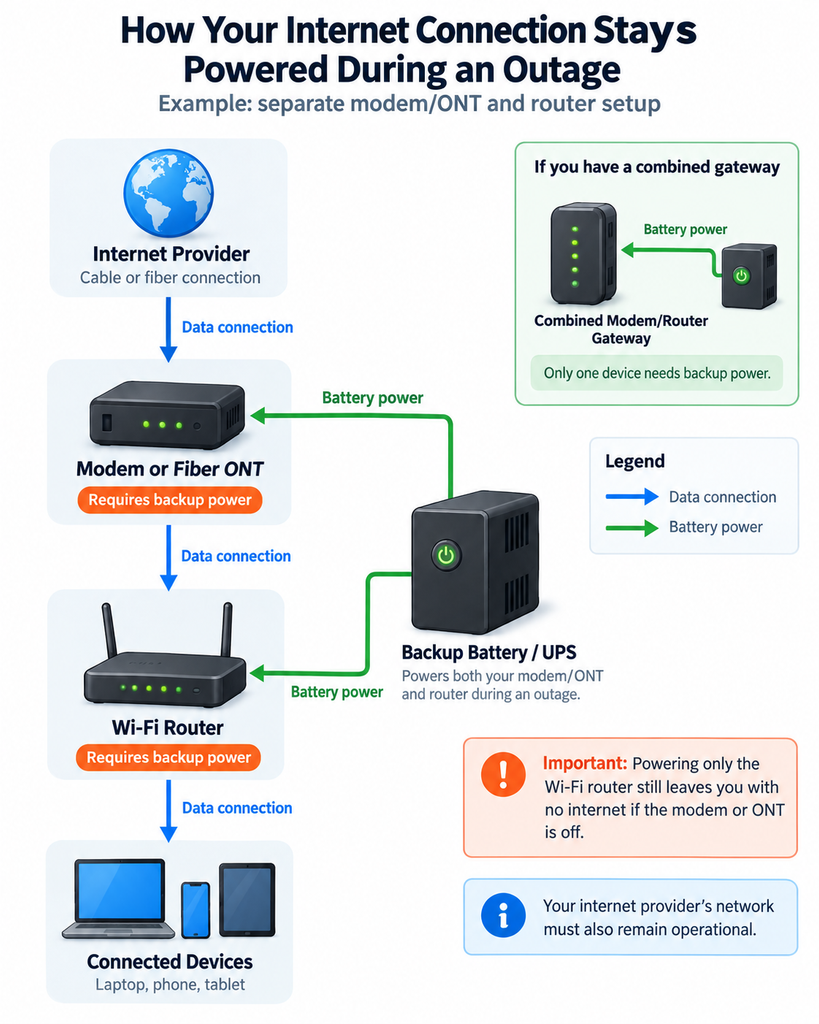
(Note: If your network requires additional powered hardware, such as an Ethernet switch or Power over Ethernet (PoE) injector, those devices must also receive battery power.)
Example: Keeping a Modem and Router Running
For illustration, assume these operating loads for a modem and router:
- Cable Modem: Consumes approximately 8 Watts during normal operation.
- Wi-Fi Router: Consumes approximately 12 Watts during normal operation.
- Total Combined Load: 20 Watts.
(Note: These wattage figures represent illustrative operating consumption rather than the maximum rated output printed on the equipment’s power adapters.)
At a constant 20W load, two hours of operation requires 40 Watt-hours (Wh) of usable energy. Because a battery’s advertised rated capacity is higher than the usable energy it delivers, obtaining a target of 50–60 Wh of usable energy (providing a safety margin for variations in power draw and battery aging) requires approximately 63–75 Wh of advertised rated capacity assuming an illustrative 80% usable energy fraction. Choosing the right backup power supply for modem and router hardware also requires verifying that the battery unit provides sufficient total wattage output and per-port current limits to power both devices simultaneously.
Automatic Battery Backup vs. Manual Battery Backup
When choosing a solution, consider how the battery handles a power drop:
- Automatic Battery Backup: When evaluating an automatic battery backup for modem and router setup, an uninterruptible power supply (UPS) or a portable power station equipped with an Emergency Power Supply (EPS) feature remains plugged into wall power and switches to battery power when electricity drops. Automatic battery backup can help keep networking equipment running when electricity fails. Whether the modem and router avoid rebooting depends on the backup device’s transfer time and the equipment’s tolerance for brief power interruptions. Test the combination before relying on it.
- Manual Battery Backup: If your battery supply does not support automatic switchover, you can manually connect your modem and router after an outage begins. Your equipment will restart, so your connection will be temporarily interrupted until devices come back online.
2. Check Your Internet Equipment Before Buying
Before purchasing backup power equipment, identify your exact network hardware and locate its electrical requirements.
Equipment Identification Guide
Your setup will generally fall into one of three categories:
- Combined Gateway (All-in-One): A single unit provided by your ISP that acts as both modem and Wi-Fi router. You only need to power this single box.
- Separate Cable/DSL Modem + Wi-Fi Router: Two distinct boxes connected by an Ethernet cable. Both boxes must receive battery power.
- Fiber Setup (ONT + Wi-Fi Router): Fiber optic cable connects to an Optical Network Terminal (ONT)—often mounted on an interior wall or inside a media closet—which then connects via Ethernet to your Wi-Fi router. Because the ONT operates upstream of the router, a dedicated modem battery backup is just as critical as powering the router itself.
Check Your Equipment’s Power Requirements
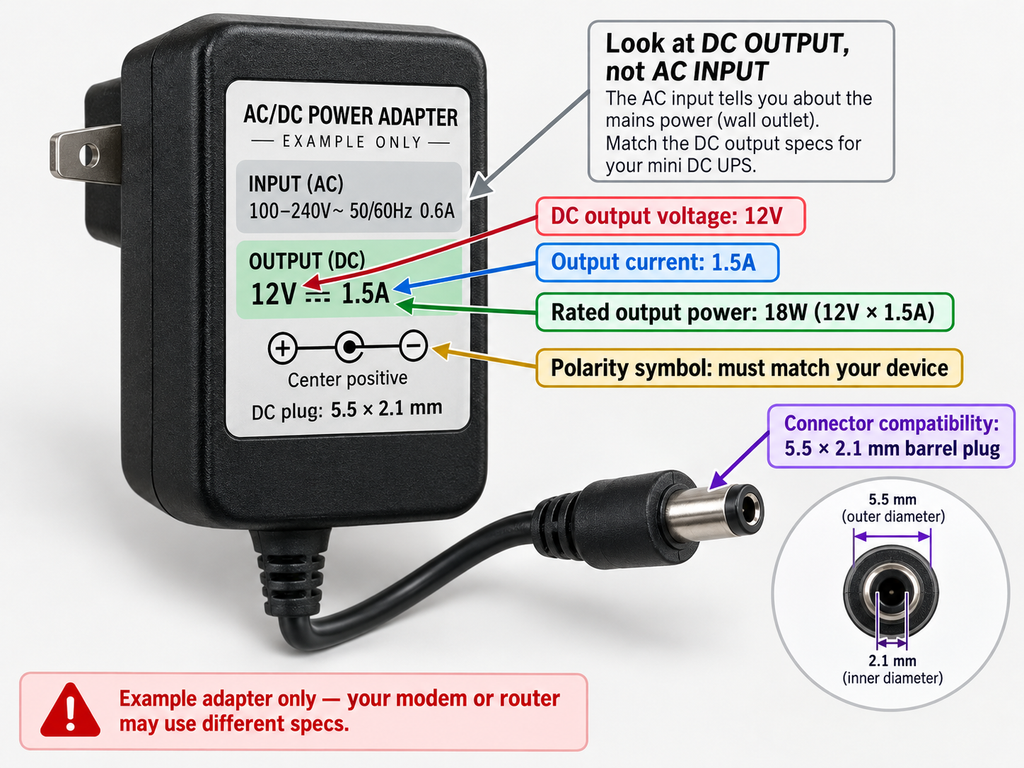
Inspect the sticker printed on the back or bottom of each device’s power adapter brick:
- Voltage (V): Indicates the required direct current (DC) operating voltage (usually 12V, 9V, or 5V DC).
- Current Rating (Amperes / A): The adapter’s output rating (e.g., 12V at 1.5A) represents the maximum current the adapter can safely supply, not necessarily the device’s constant consumption.
- Maximum Output Wattage (W): Calculated as $\text{Volts} \times \text{Amperes} = \text{Watts}$ (e.g., $12\text{V} \times 1.5\text{A} = 18\text{W}$ max output rating). Actual operating draw is typically lower and can be measured using a plug-in watt meter or checked in manufacturer specifications.
Note: Pay attention to the adapter’s DC output specifications rather than its AC input ratings (such as 100–240V AC). An AC plug-in watt meter measures consumption at the wall outlet (including the power adapter’s internal conversion losses), which is useful for sizing an AC UPS. When using a direct-DC mini UPS, the load is drawn on the DC side after the factory adapter is bypassed.
Equipment Power Loss vs. Internet Provider Outages
Supplying battery power to your local hardware restores Wi-Fi during a local internet power outage caused by building utility failure. However, local battery backup cannot restore service if the outage damages physical fiber cables or shuts down your Internet Service Provider’s (ISP) local distribution facilities. While major ISPs equip neighborhood nodes with generator or battery reserves, large-scale storm damage or extended utility failures can still cause upstream service disruptions.
3. Choose a Backup Solution
Three primary battery options exist for backing up home internet equipment. The best choice depends on your budget, required runtime, and whether you need automatic switchover with minimal interruption.
(Note: Prices listed below are rough illustrative USD price bands; actual prices vary by model, capacity, retailer, and sales.)
| Backup Type | Connection Method | Automatic Switchover | Estimated Cost (USD) | Best Use Case |
|---|---|---|---|---|
| Mini DC UPS | Direct DC barrel cables | Designed for automatic DC backup | $30 – $60 | Renters, budget setups, low-power DC gear |
| Standard UPS | Standard AC wall outlets | Fast automatic switching; usually maintains network gear | $80 – $180 | Home offices requiring minimal disruption |
| Portable Power Station | AC outlets & DC/USB ports | Depends on model (EPS mode may cause reboots) | $150 – $400+ | Multi-device backup during extended outages |
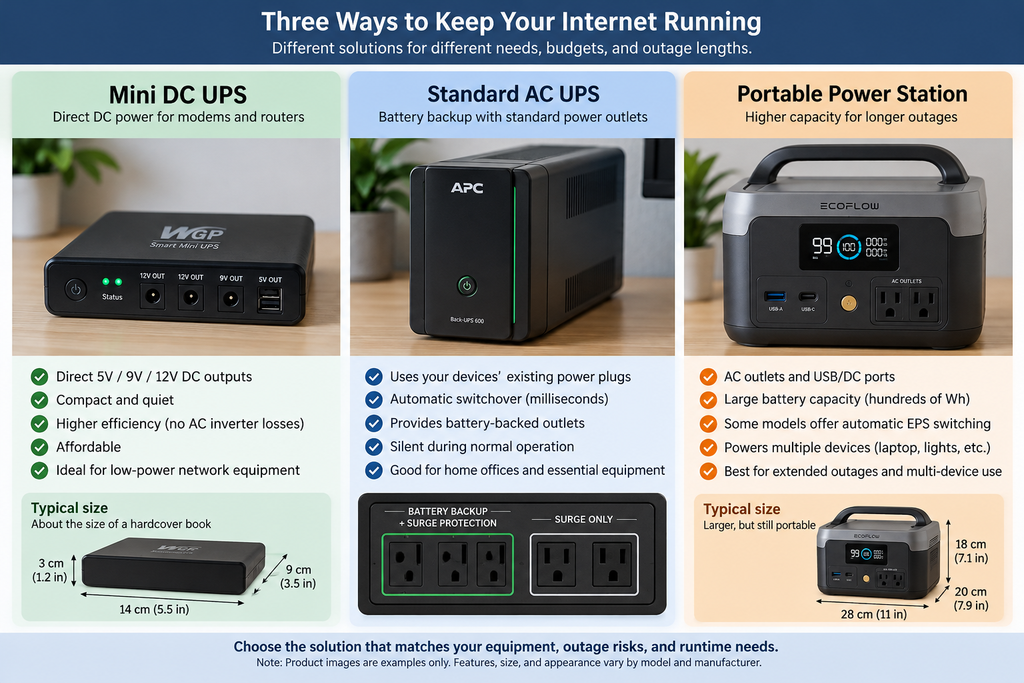
Option A: Mini DC UPS (Direct DC Power)
A dedicated mini UPS for router and modem gear powers 12V, 9V, or 5V devices directly using DC barrel cables, bypassing the AC power bricks entirely.
- Pros: Highly energy-efficient (avoids extra DC-to-AC-to-DC conversion steps while running on battery), compact, silent, and affordable.
- Compatibility Checklist (Verify 5 Points):
- Voltage (V): Must match device requirements exactly (e.g., 12V output port to 12V router).
- Current Rating (A): Battery port output amperage must equal or exceed the device’s required input amperage.
- Connector Size & Type: Verify barrel plug dimensions (e.g., 5.5×2.1mm vs. 5.5×2.5mm). Be aware that some specialized routers use USB-C, Power over Ethernet (PoE), or proprietary connectors that are incompatible with standard DC barrel cables.
- Polarity: Check the polarity symbols printed on the device and its original power adapter. The backup supply must use the exact same polarity. Do not assume that every barrel connector is center-positive.
- Total Output Capacity: The combined wattage of all connected devices must not exceed the battery’s maximum rated output limit.
Option B: Standard Router UPS (AC Battery Backup)
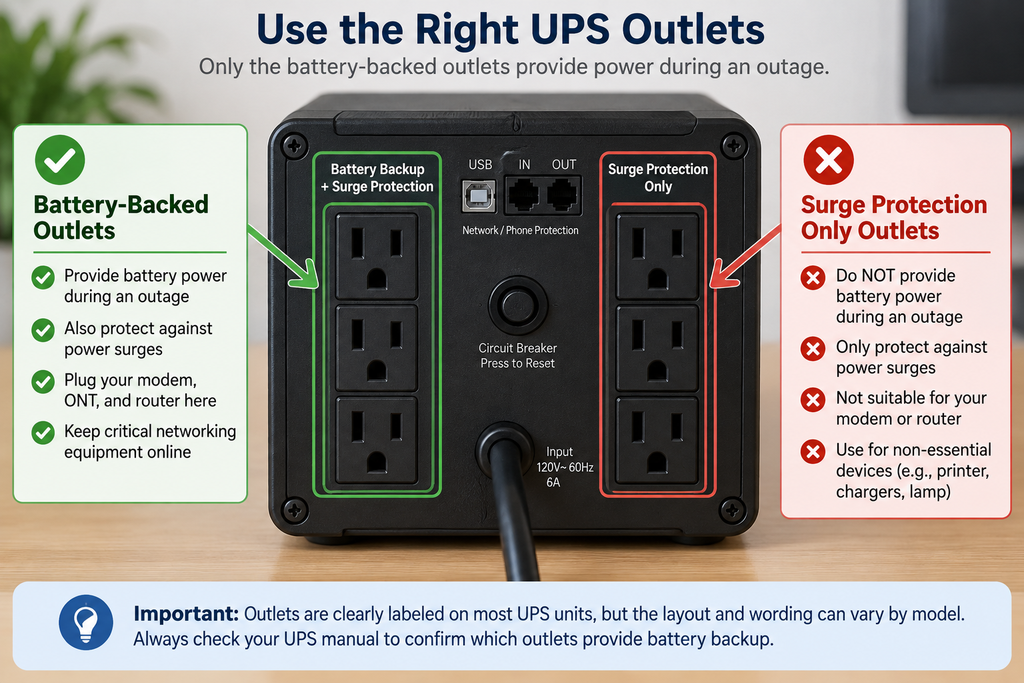
A standard AC router UPS (standby or line-interactive model) stays plugged into the wall. Under normal conditions, utility power passes to your equipment while keeping the internal battery charged.
- Switchover Behavior: When grid power fails, the UPS automatically switches to battery power. Transfer time varies by model, typically occurring within milliseconds (for example, Schneider Electric documents transfer times of approximately 2–10 ms for certain line-interactive models: Schneider Electric FAQ). Check manufacturer specifications and test your equipment to confirm compatibility.
- Pros: Uses standard wall outlets; simple plug-and-play setup using factory power adapters; helps prevent router reboots during momentary power blinks.
- Essential Setup Rule: When setting up a standard UPS for router and modem hardware, plug both your modem/ONT and router into sockets explicitly labeled “Battery Backup” (or “Battery + Surge”). Outlets labeled only “Surge Protection” will lose power immediately during a blackout.
Option C: Portable Power Station
A portable lithium power station (200Wh–500Wh+) offers high capacity and multiple output ports for extended outages.
- Important Transfer Time Warning: Some portable power stations provide automatic emergency power switching (EPS), but the brief transition interruption can cause certain sensitive routers or fiber modems to reboot before battery power engages. For example, EcoFlow specifies an EPS transfer time of under 30 ms for models like the RIVER 2 and cautions that EPS functionality is not identical to a zero-delay uninterrupted UPS (EcoFlow RIVER 2 Specifications; EcoFlow Product FAQ). Verify your power station’s stated transfer time and test your modem and router before relying on it.
4. How Long Will Your Battery Last? (Calculating Runtime)
A battery’s advertised capacity (expressed in Watt-hours, or Wh) represents gross energy storage, not the exact amount delivered to your devices. Energy is lost as heat during conversion, through inverter overhead, and during battery discharge.
The Planning Formula
To calculate a realistic planning estimate, use this hypothetical formula:
$$\text{Estimated Runtime (Hours)} \approx \frac{\text{Battery Rated Capacity (Wh)} \times \text{Assumed Usable Fraction}}{\text{Total Combined Load (Watts)}}$$
Worked Calculation Example
Suppose you have a 100 Wh battery backup for router and modem hardware powering the 20 W network setup from Section 1 (8W modem + 12W router), assuming an illustrative 80% (0.80) usable energy fraction:
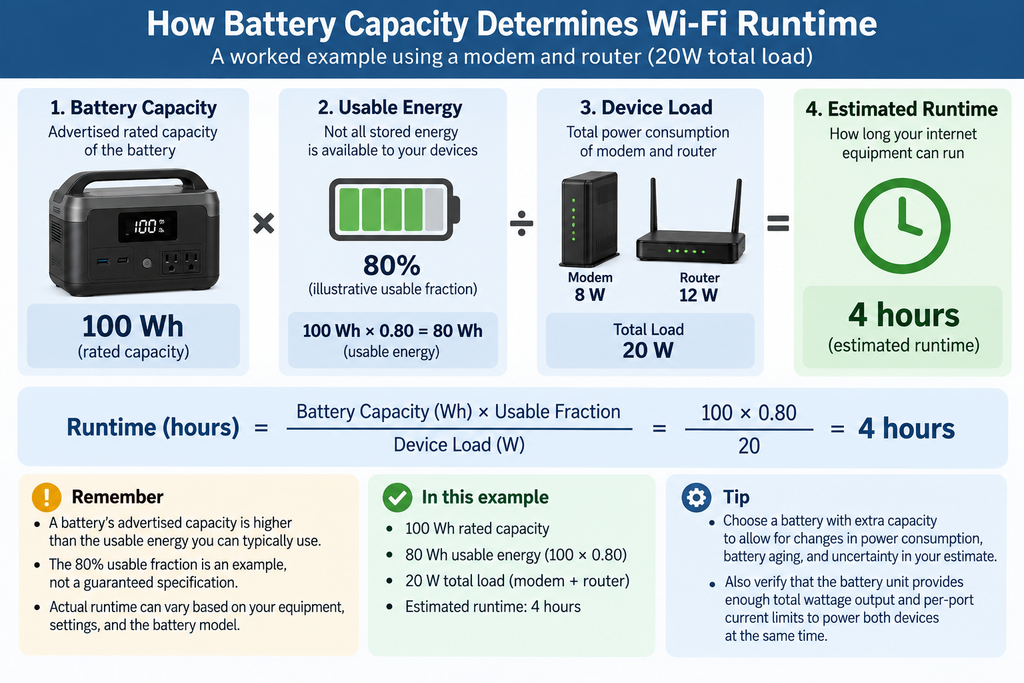
Note: The 80% fraction is a hypothetical planning assumption, not a guaranteed specification for a specific product class. For a final purchasing decision, consult the manufacturer’s published runtime charts or perform a monitored test. At very light network loads (10W–20W), an AC inverter’s self-consumption can materially reduce actual efficiency below 80%. Additionally, check whether your load meets the minimum wattage shown on the manufacturer’s chart (for example, some APC 600VA runtime charts start at 33W rather than 20W: APC 600VA Product Specifications).
Key Electrical Distinctions to Keep in Mind
- VA is not Wh: A UPS rated at 600VA describes its apparent-power handling capacity, not 600 Watt-hours of stored energy.
- mAh is not Wh without Voltage: Small power banks often list capacity in milliamp-hours (mAh). A 10,000 mAh battery at a nominal 3.7V stores 37 Watt-hours ($3.7\text{V} \times 10\text{Ah} = 37\text{Wh}$). Always convert to Watt-hours when calculating runtime.
5. Test Your Backup Before an Outage
Do not wait for a severe storm to discover an equipment incompatibility or an unpowered socket. Test your backup system using this 5-step sequence:
- Simulate Power Failure: Unplug the UPS or power station from the wall receptacle while your network is active.
- Verify Switchover: Check that both the modem/ONT and router stay powered on without rebooting.
- Check That the Internet Works: Open a fresh webpage on a Wi-Fi device to ensure data is actively flowing across your connection.
- Initial Drain Test: Run the network on battery power for 1 hour to observe performance. Note that battery percentage displays can be non-linear; use a 1-hour test as an initial estimate. For critical work-from-home setups, perform a supervised test for the full intended duration.
- Check Output Timeout / Eco-Mode: If your power station has an automatic output shutdown or power-saving setting (eco-mode), verify that its AC or DC output remains continuously active under low network loads throughout the planned backup period (for instance, see model-specific setting instructions in the EcoFlow DELTA 2 Manual).
6. Wi-Fi Works but the Internet Doesn’t: What to Check
If your local equipment remains powered but you cannot access websites, use this simple troubleshooting sequence to identify the issue:
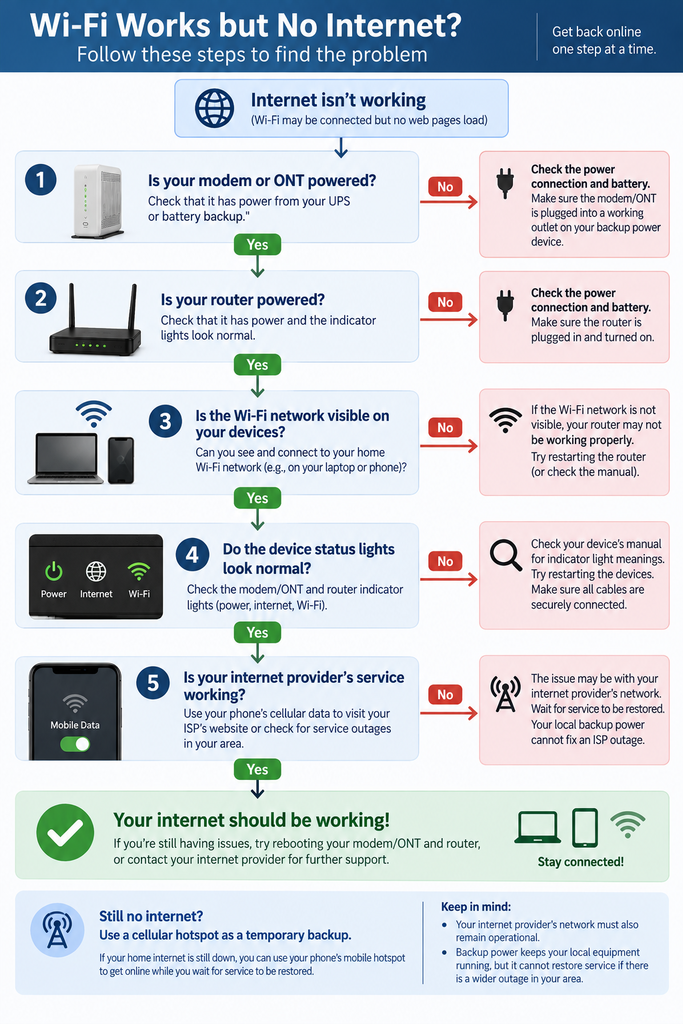
Cellular Backup Options
When broadband cable or fiber lines fail upstream, cellular data provides an alternate path:
- Smartphone Hotspot: Enable hotspot mode on your mobile phone to share cellular data with your laptop. This is the simplest fallback for beginners.
- Optional Automatic Cellular Failover: Some advanced routers support automatic backup internet through a compatible cellular modem, 5G hotspot, or pass-through failover cradle (such as a NETGEAR cradle or GL.iNet router). When configured, the router switches to cellular data if landline broadband fails.
- In-Home Cell Extenders Note: If you use an in-home LTE Network Extender provided by your mobile carrier, note that these devices route mobile calls through your home broadband connection. When home broadband fails, the extender stops working; check your phone’s direct reception from outdoor cell towers.
- Cell Tower Congestion Warning: During widespread power failures, regional cell towers often experience high traffic as neighborhood residents switch to mobile data. Internet speeds may decrease. Pause cloud backups, video streaming, and non-essential downloads to preserve bandwidth for messaging and emergency updates.
7. Safety and Small-Space Setup
Setting up backup power in an apartment or rental home requires attention to thermal management, space limits, and electrical safety.
Safe Placement and Ventilation
- Electrical Safety Certifications: Choose electrical equipment and chargers certified for use in your country. In Canada, look for recognized approval marks such as CSA, cUL, or cETL on the product label (Health Canada — Electrical Product Safety); in the US, look for UL, ETL, or CSA marks. Always follow manufacturer charging and operating instructions.
- Never Use Fuel Generators Indoors: Gas, propane, or diesel generators produce deadly carbon monoxide. Never operate a fuel-burning generator inside an apartment, home, garage, or enclosed balcony. Health Canada advises operating portable generators outdoors at least 6 metres (20 feet) away from buildings, with exhaust directed away from doors, windows, and vents (Health Canada — Preventing Carbon Monoxide Exposure). An apartment balcony generally cannot provide this required separation distance.
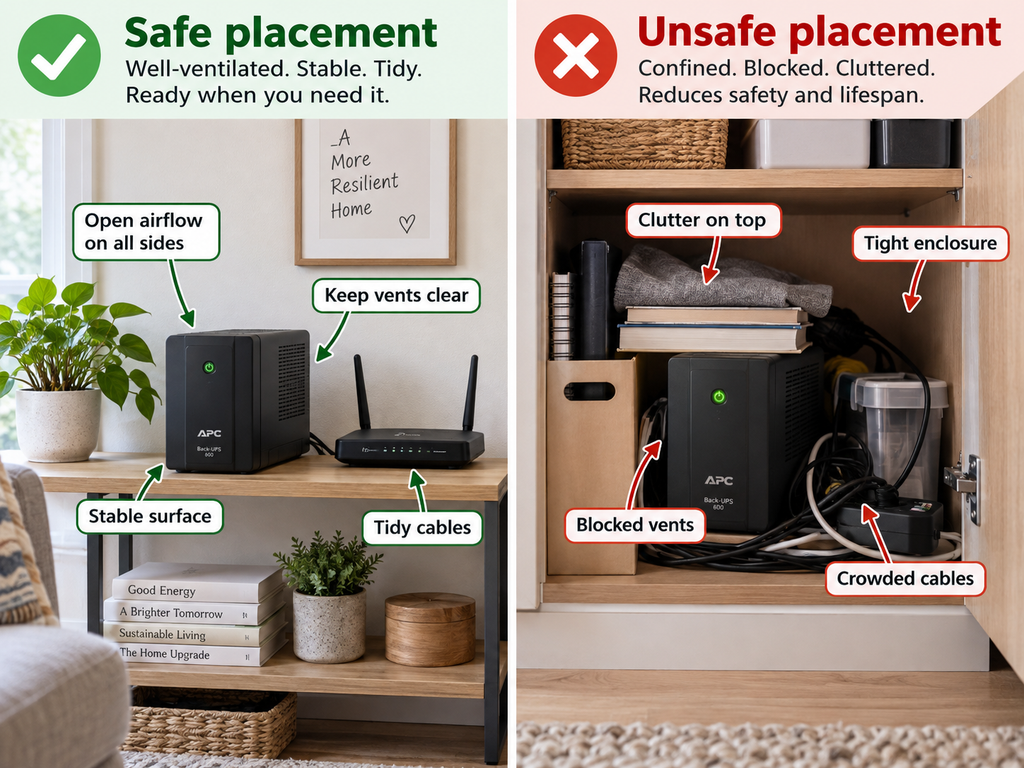
- Safe Placement and Ventilation: Place batteries and routers on flat, hard surfaces with adequate airflow. Do not enclose operating power stations or UPS units inside unventilated cabinets or tight closets.
- Outlet Spacing & Connection Rules: Choose a UPS with enough battery-backed outlets and sufficient spacing for your equipment’s power adapters. Follow the manufacturer’s connection instructions, and avoid extension cords or power strips on UPS output receptacles unless explicitly permitted by the manufacturer (APC / Schneider Electric Guidance).
Make Your Battery Last Longer
To extend runtime during an outage, power only essential communications hardware:
- Essential Devices: Fiber ONT / Cable Modem + Primary Wi-Fi Router.
- Non-Essential Devices: Disconnect secondary mesh satellite nodes, Network Attached Storage (NAS) drives, smart speakers, TV streaming sticks, and gaming consoles. For mesh network users (such as those using Eero mesh systems with built-in eero internet backup cellular options), remember that powering down secondary satellite pucks conserves main battery runtime.
8. Backup Setups for Different Outage Lengths
Scenario Playbooks
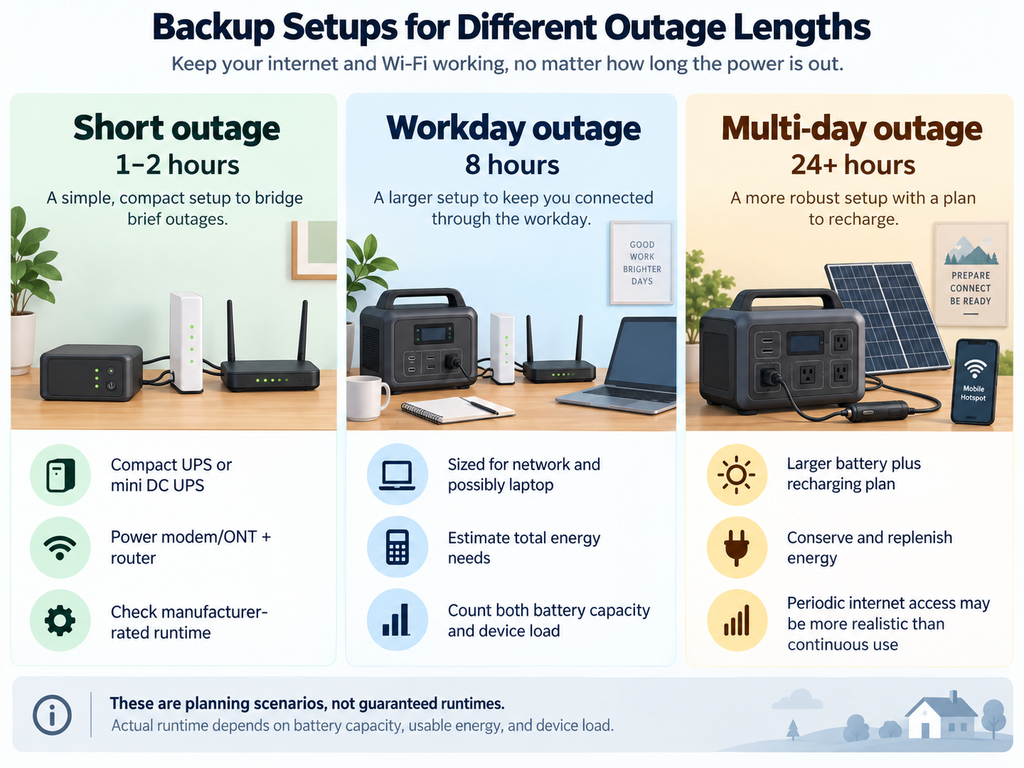
- 1–2 Hour Power Outage
- Setup: Choose a mini DC UPS or standard AC UPS whose manufacturer-rated runtime is at least two hours at your combined modem-and-router load. Check its runtime chart rather than relying on the VA rating alone.
- Scope: Powers the essential modem/ONT and router; physical size, weight, and battery-operation noise (such as alarms or fans) depend on the specific model.
- 8-Hour Workday Outage
- Internet-Only Scenario: 20W network load operating over 8 hours requires 160 Wh of usable energy ($\approx 200\text{Wh}$ battery capacity assuming an 80% usable fraction).
- Internet + Laptop Scenario: A 20W network load plus a laptop drawing an average of 30W yields a 50W combined load. Over 8 hours, this requires 400 Wh of usable energy ($\approx 500\text{Wh}$ battery capacity assuming an 80% usable fraction). Alternatively, relying on the laptop’s internal battery for part of the shift reduces external battery requirements.
- Multi-Day Emergency Outage (24+ Hours)
- Setup: 500Wh+ Power Station paired with solar or 12V vehicle charging cables, plus a cellular hotspot fallback.
- Scope: Supports periodic internet access, phone charging, and emergency lighting.
- Capacity Caveat: A 500Wh battery is not sufficient for continuous multi-day internet service ($500\text{ Wh} \times 0.80 / 20\text{ W} = 20\text{ hours}$ of continuous network runtime). Longer outages require periodic operation, a larger battery system, or a reliable way to recharge.
- Important Operational Caveats: Solar charging is practical only if you have a safe outdoor location receiving direct sunlight (charging through window glass is substantially less effective). For vehicle charging, combustion-engine vehicles must never be left idling inside a garage or enclosed space.
Final Action Checklist
- Check Your Labels & Specs: Inspect the voltage, current, and connector specs on your modem/ONT and router power adapters.
- Select Your Tier: Choose a Mini DC UPS for compact, efficient backup, a standard AC UPS for fast automatic switching, or a portable power station when you need additional battery capacity.
- Test Before the Outage: Run a supervised blackout simulation test today to confirm switchover, outlet connections, and real-world runtime.
[…] ***For step-by-step setup diagrams, Mini DC UPS checklists, and runtime calculation formulas, read our …*** […]