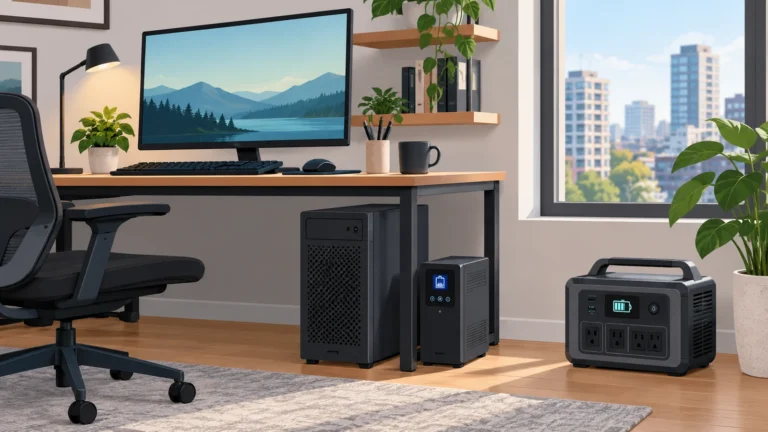
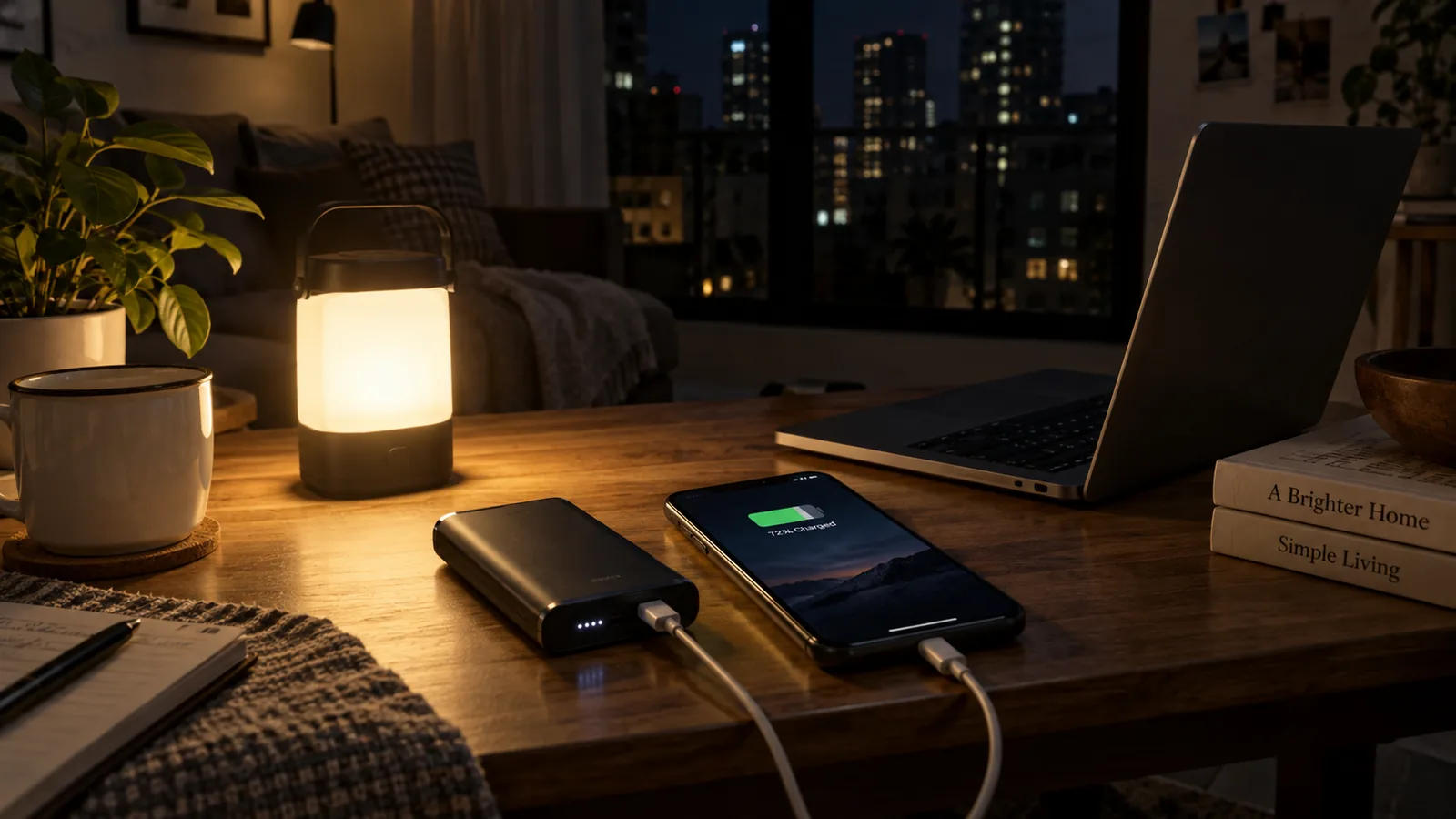
If you are looking for how to charge phone without electricity during a blackout, you can keep your essential devices running by using a pre-charged portable power bank, a compatible laptop or tablet, or a vehicle’s USB charging port. If none of these is immediately available, reduce your phone’s power consumption right away and identify nearby community facilities—such as public libraries, municipal reception centers, or operational workplaces—that may offer public charging access.
For blackouts lasting several days, selecting the right portable charger for power outage resilience does not require an expensive generator or a heavy AC battery power station. Individual USB power banks are relatively affordable (typically $25 to $90 USD / $35 to $120 CAD per unit), while a multi-device household reserve will cost more depending on the number of units, capacity, and charging performance required. Sized to your household’s actual energy needs, a modest set of pre-charged power banks can keep personal communications, rechargeable lights, and essential computing gear running safely.
However, keeping devices charged is an electronics power plan, not a guarantee of network access. Cellular towers, internet service providers, and home routers may experience separate infrastructure outages during a power failure, interrupting calls or data even if your phone remains fully charged.
Before buying backup gear, the most important step is estimating how much energy your household actually needs. This guide provides a practical, mathematically grounded way to estimate, select, use, and store portable power banks for short and extended blackouts—without wasting money, cluttering your living space, or overcomplicating your setup.
1. How to Charge Your Phone During an Outage Right Now
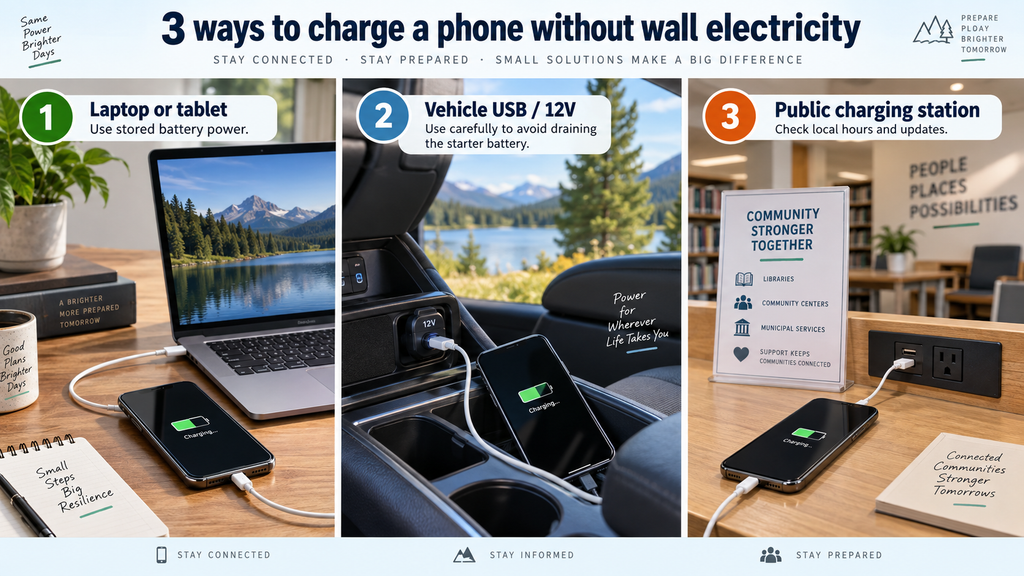
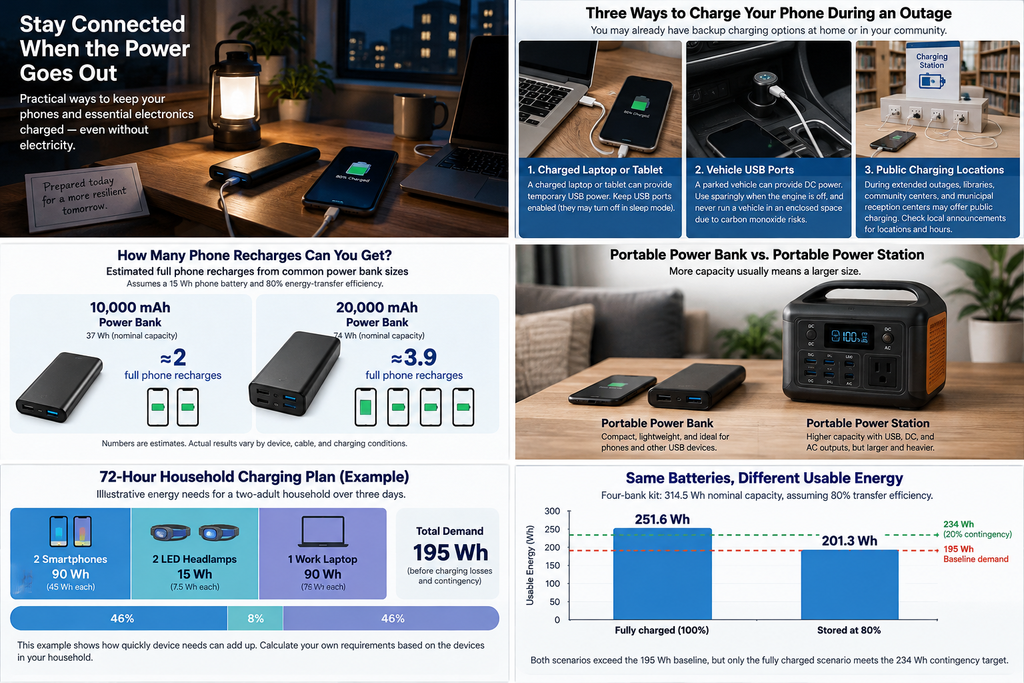
If an outage catches you by surprise and you are wondering how to charge my phone without a charger or wall plug, you can draw emergency power from stored energy sources already in your home before using dedicated backup batteries.
How to Charge My Phone Without a Charger (Using Energy Reserves You Already Have)
- Charged Laptops and Tablets: A laptop with a charged internal battery can act as an emergency power bank. A typical work laptop contains a 50–70 watt-hour (Wh) battery, which can potentially provide two to three full phone recharges. Keep in mind that available charging depends on the laptop’s current battery level, system power draw, and USB output settings; many laptops stop powering USB ports when turned off or placed in deep sleep. Ensure the laptop is configured to keep its USB ports active.
- Vehicle USB Ports and 12V Outlets: Parked vehicles offer a substantial direct-current (DC) power source. However, standard vehicle starter batteries are designed for short, high-current bursts to start an engine—not for continuous deep discharge. Draining a car’s starter battery while the engine is off can leave the vehicle unable to start.
- Engine Safety Boundary: Never run a vehicle engine inside an enclosed garage, carport, or covered structure due to lethal carbon monoxide risks (as emphasized in CDC carbon monoxide safety guidance). If charging requires running the car engine, only do so while parked outdoors in an open, well-ventilated area away from building windows and air vents. If using a vehicle in accessory mode without running the engine, monitor battery usage closely to avoid depleting the starter battery.
Community Charging Locations
If you have no working power banks, laptop reserves, or vehicle access, look for public emergency phone charging options in your local area. During extended grid disruptions, municipal emergency reception centers, public libraries, community halls, and operational workplaces may offer dedicated public charging stations. Facilities and opening hours vary by municipality, so check local civic announcements before traveling.
| Emergency Power Reserve | Power Available / Requirements | Practical Usage & Limitations |
|---|---|---|
| Charged Work Laptop | 50 Wh – 70 Wh internal battery | Potentially ~2–3 phone charges; laptop must keep USB ports powered. |
| Tablet / iPad | 28 Wh – 40 Wh internal battery | Potentially ~1–2 phone charges if tablet supports USB power-out. |
| Parked Vehicle (12V/USB) | 12V Lead-Acid Starter Battery | Use sparingly when engine is off; running engine requires being outdoors. |
| Public Emergency Hubs | Municipal / Civic Power Outlets | May offer public charging; verify opening hours and safety announcements. |
2. How to Make Your Phone Battery Last Longer
Reducing your phone’s energy consumption extends your backup power reserves significantly, directly lowering how often you need to recharge.
Immediate Battery-Saving Steps
- Turn On Low Power / Battery Saver Mode: This setting restricts background app refresh, lowers processor speeds, reduces screen refresh rates, and dims automatic display backlights.
- Lower Screen Brightness: Display backlighting is one of the largest single consumers of smartphone battery power. Dim your display to the lowest readable level and set the screen auto-lock timer to 30 seconds.
- Turn Off Non-Essential Radios: Disable Bluetooth, Wi-Fi searching (if home routers are unpowered), and location polling when not actively navigating.
- Switch to Text Messaging: Prioritize SMS text messages or text-based messaging apps over voice calls and video streaming. Text transmissions consume minimal radio power compared to continuous voice or video links.
Emergency Function Caveat: Battery-saving and Airplane Mode settings can affect emergency functions, depending on the phone and its configuration. For example, Google Pixel emergency help documentation explicitly warns that Emergency SOS on supported Pixel devices does not work with Battery Saver or Airplane Mode enabled. Check your phone’s emergency settings in advance, and avoid disconnecting cellular service when you need to receive calls or cellular emergency alerts.
Airplane Mode and Emergency Alert Trade-Offs
When cellular service becomes weak or degraded, smartphones automatically increase radio transmitter power to search for a signal, which can accelerate battery drain.
Switching your phone to Airplane Mode stops this active network searching and saves battery power. However, Airplane Mode disconnects your phone from cellular networks, preventing you from making or receiving standard cellular calls, SMS messages, or wireless emergency alerts.
Treat Airplane Mode as a selective, temporary battery preservation tactic rather than a continuous setting during an active emergency. Note that on supported devices, Wi-Fi or satellite features can be selectively re-enabled under specific conditions (per Apple’s Airplane Mode guidance).
3. How Much Portable Power Bank Capacity Do You Need?
Choosing the right portable charger starts with understanding how battery capacity is advertised and why manufacturer labels can be confusing.
Understanding How Many Charges a Power Bank Provides
Most portable chargers list capacity in milliamp-hours (mAh)—for example, 10,000 mAh or 20,000 mAh. This mAh figure reflects the capacity of the internal lithium-ion cell at its standard nominal cell voltage of 3.7 Volts.
However, USB standards transfer power at higher voltages (5V for standard USB, or 9V, 15V, and 20V+ for fast charging). Because milliamp-hours change whenever voltage changes, comparing power banks strictly by mAh ratings can be misleading.
Converting mAh to Watt-Hours (Wh)
The standard unit for stored energy is the Watt-hour (Wh), which accounts for both voltage and current. You can estimate the nominal stored energy of any standard 3.7V lithium-ion power bank using this formula:
Applying this formula to common power bank sizes shows their approximate nominal energy storage:
- 10,000 mAh Power Bank:
- 20,000 mAh Power Bank:
- 25,000 mAh Power Bank:
Note: Always prioritize the official Watt-hour rating printed directly on the device casing or product manual by the manufacturer, as internal cell chemistry and nominal voltages can vary.
Accounting for Energy Lost During Charging
No portable charger transfers 100% of its stored energy into a phone’s battery. Energy is lost as heat through internal DC-to-DC voltage stepping, protocol negotiation circuits, cable resistance, and the phone’s internal charge regulation.
Because of these combined conversion losses, actual efficiency varies with the power bank, device, voltage, cable, and use conditions; for the planning estimates below, we assume an 80% energy-transfer efficiency.
For planning purposes, using 80% usable efficiency serves as an illustrative planning assumption rather than a guaranteed universal baseline.
Evaluating charging expectations in Watt-hours provides a clear picture of usable power:
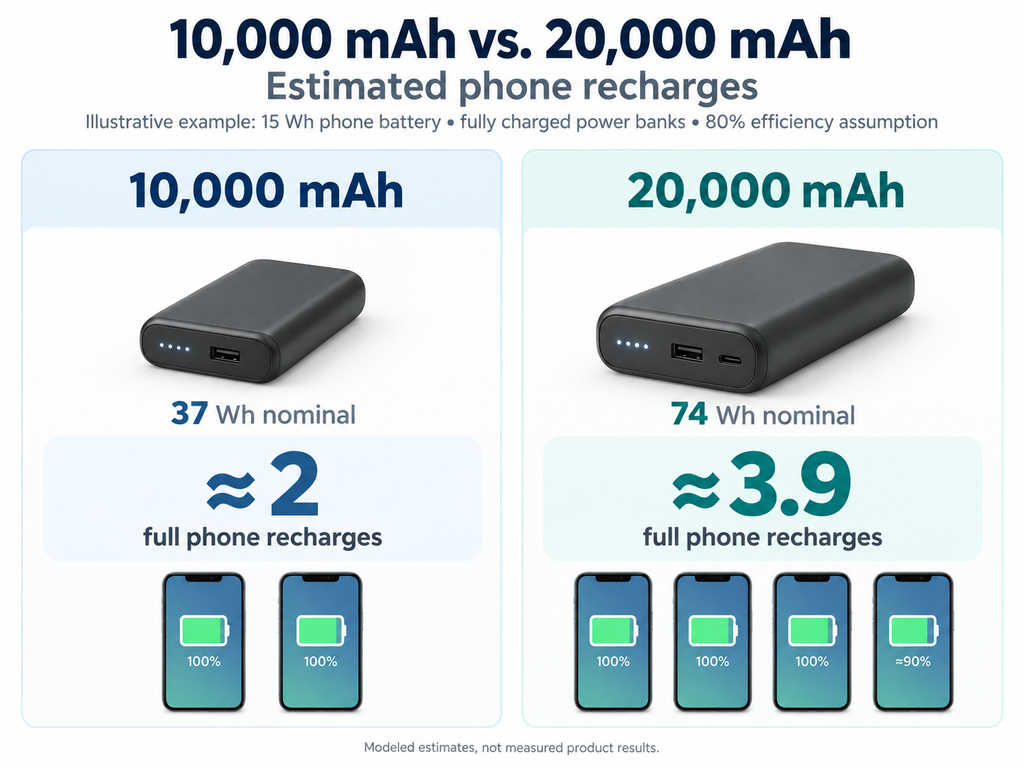
- Theoretical Energy Comparison: A nominal 74 Wh (20,000 mAh) power bank divided by a 15 Wh smartphone battery suggests approximately 4.9 theoretical recharges ().
- Usable Energy Comparison: At an assumed 80% usable efficiency (), typical 20000mah power banks deliver approximately 3.9 estimated recharges () at the assumed 80% efficiency.
Quick Single-Phone Sizing Example
A fully charged 10000 mah portable charger (37 Wh) could provide roughly two full recharges of a phone with a 15 Wh battery, assuming 80% energy-transfer efficiency (~29.6 Wh usable). If the bank starts at 80% charge (as recommended for long-term storage), expect closer to 1.6 recharges under the same assumptions. For longer blackouts or multi-device households, expand your plan using the detailed sizing table below.
Power-Bank Capacity Sizing Worksheet
Use this table as a planning tool to estimate realistic device recharges:
| Power Bank Class | Stated Capacity (mAh @ 3.7V) | Estimated Capacity (Wh) | Usable Energy (@ 80% Efficiency) | Target Device & Battery Size | Estimated Usable Recharges |
|---|---|---|---|---|---|
| Compact Daily | 10,000 mAh | 37 Wh | ~29.6 Wh | Smartphone (15 Wh) | ~2.0 full charges |
| Mid-Size Family | 20,000 mAh | 74 Wh | ~59.2 Wh | Smartphone (15 Wh) | ~3.9 full charges |
| Mid-Size Family | 20,000 mAh | 74 Wh | ~59.2 Wh | iPad / Tablet (30 Wh) | ~2.0 full charges |
| Laptop-Class | 25,000 mAh | 92.5 Wh | ~74.0 Wh | Work Laptop (60 Wh) | ~1.2 full charges |
4. Power Bank vs. Portable Power Station
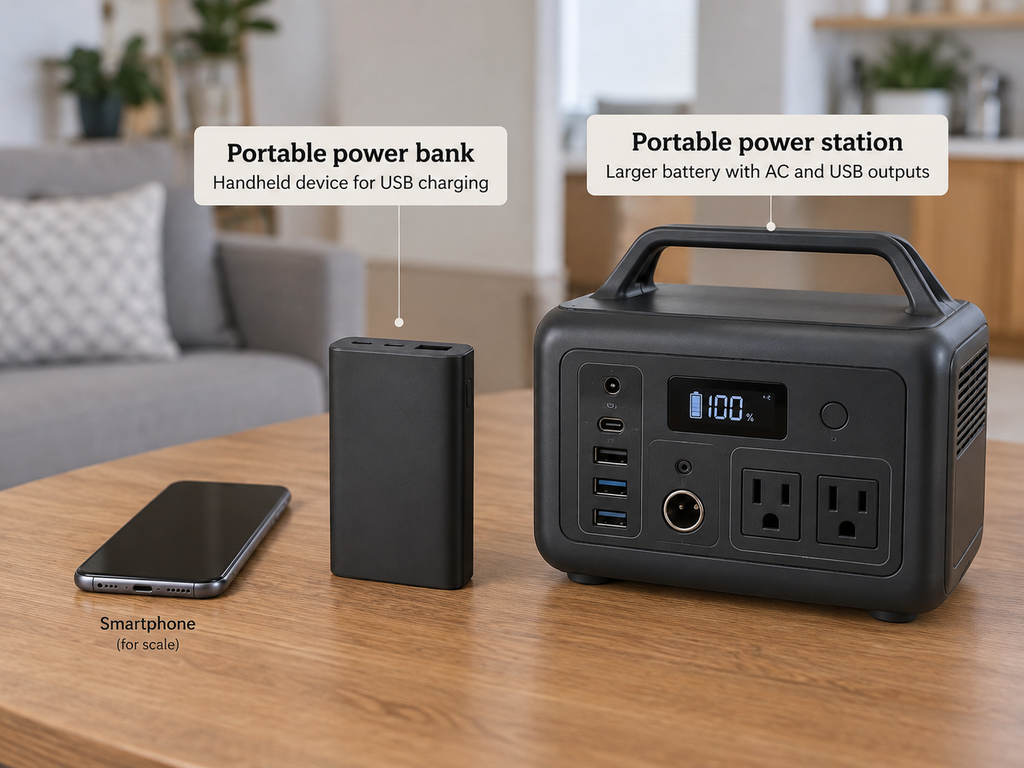
Avoiding unnecessary expenses during outage preparation means matching your backup hardware to your actual household priorities.
| Feature / Consideration | USB Portable Power Bank | AC Portable Power Station |
|---|---|---|
| Primary Purpose | Phones, tablets, headlamps, USB laptops | Refrigerators, medical CPAP, AC lamps, fans |
| Output Connections | USB-C, USB-A ports (DC voltages vary) | 120V AC wall outlets, USB, 12V DC ports |
| Energy Storage Range | 37 Wh – 92.5 Wh (10k – 25k mAh) | 256 Wh – 2,000+ Wh |
| Typical Cost | ~$25 – $90 USD / $35 – $120 CAD | ~$200 – $1,500+ USD |
| Storage & Size | Takes up little storage space; fits in drawer | Size of a shoebox, cooler, or heavy crate |
| Apartment Rules | Usually needs no permanent installation; check building rules | No fuel/exhaust; check building battery rules |
When a Compact Power Bank Is Enough
If your goal during an outage is keeping personal communications working, powering rechargeable LED headlamps, and maintaining light laptop usage, a set of compact USB power banks ($25 to $90 USD per unit) is the simplest, most affordable portable phone charger setup for emergency resilience. They take up little storage space, operate silently, produce no combustion exhaust (though they warm up during heavy use), and require no permanent installation.
When an AC Power Station or Alternative Backup Is Needed
A portable power station with AC outlets may be appropriate when the equipment you need to run requires wall-outlet power, such as certain household appliances. Other equipment may support compatible DC backup systems or a dedicated uninterruptible power supply (UPS).
Note: For medical equipment such as CPAPs, consumer runtime estimates should never replace an equipment-specific emergency plan. Consult your healthcare provider and equipment manufacturer for approved backup options. If your priority includes keeping home Wi-Fi routers or fiber ONTs running during blackouts, see our companion guide on backing up home Wi-Fi routers and fiber ONTs.
5. Choosing a Laptop Power Bank and Portable Phone Charger
When selecting a power bank for emergency backup, evaluate these key features, fast-charging standards, and safety credentials.
Fast-Charging Compatibility (PD & PPS)
- USB-C Power Delivery (PD): While older 10W USB-A chargers remain usable for emergency phone top-ups, USB-C Power Delivery (PD 3.0 / PD 3.1) is recommended for faster recharges and laptop compatibility. USB PD standards support Extended Power Range (EPR) profiles beyond 20V for high-power hardware.
- Programmable Power Supply (PPS): PPS fine-tunes output voltage in small 20mV increments during fast charging, which can help reduce heat build-up inside compatible Samsung and Android phones, preserving charging efficiency and battery health.
Output Wattage Requirements for a Portable Laptop Charger
Smartphones charge easily from 15W–20W outputs. Laptops require higher output wattage. Note that wattage alone does not determine laptop charging capability; supported USB-C voltage profiles, cable rating, and laptop power limits all matter. Connecting a standard 15W phone charger to a work laptop will usually result in the laptop refusing the charge or displaying “Plugged in, not charging.”
When selecting a laptop power bank, verify your specific laptop model and charger compatibility before relying on a portable laptop charger for remote work:
| Laptop Type | Typical Internal Battery | Typical Output to Look For (Illustrative) |
|---|---|---|
| Chromebook / Ultrabook | 38 Wh – 50 Wh | 30W – 45W USB-C PD |
| Standard Work Laptop | 50 Wh – 70 Wh | 65W USB-C PD |
| 16-inch Performance PC | 70 Wh – 100 Wh | 87W – 100W+ USB-C PD |
Note: Some laptops accept lower-wattage charging (30W–45W) when powered off or sleeping, even if they require 65W+ during active operation.
Illustrative Extra Operating Time for Laptops
Wattage determines whether a power bank can charge your laptop, while Watt-hours determine how much extra operating time it provides.
For example, a 20,000 mAh (74 Wh) power bank delivering ~59.2 Wh of usable energy (@ 80% efficiency) provides these illustrative operating extensions across different average laptop power draws:
- 10W average draw (light editing, dimmed screen):
- 15W average draw (standard office tasks, web browsing):
- 20W average draw (heavy multitasking, active video calls):
- 30W average laptop power draw (during more demanding use):
(Remember that 30 Wh/day allocated in a multi-day budget represents limited light computer use, not a full 8-hour continuous remote workday).
Cable Strategy and Built-in Redundancy
A backup battery is unusable if its charging cable breaks or goes missing in the dark.
- Integrated Cables: Power banks with built-in USB-C cables offer convenience without cord clutter.
- Independent Port Redundancy: Select models that also include separate external USB-C ports. If an integrated cable wears out, independent ports allow you to use standard standalone cables.
Safety Standards and Independent Certification
Look for independent safety certification from a recognized testing organization (indicated by a UL, CSA, or equivalent mark). The ANSI/CAN/UL 2056 safety standard is one relevant safety standard specifically covering portable power banks rated up to 100 Wh.
Verify that the certification applies to the specific product model rather than relying solely on a manufacturer’s advertising claims. You can verify UL certification listings directly via official safety database portals like the UL Solutions Product iQ database.
6. Creating a 24–72 Hour Household Charging Plan
Building a reliable emergency power plan involves calculating your household’s total energy budget over an expected blackout duration.
Worked 3-Day Household Energy Plan (2 Adults)
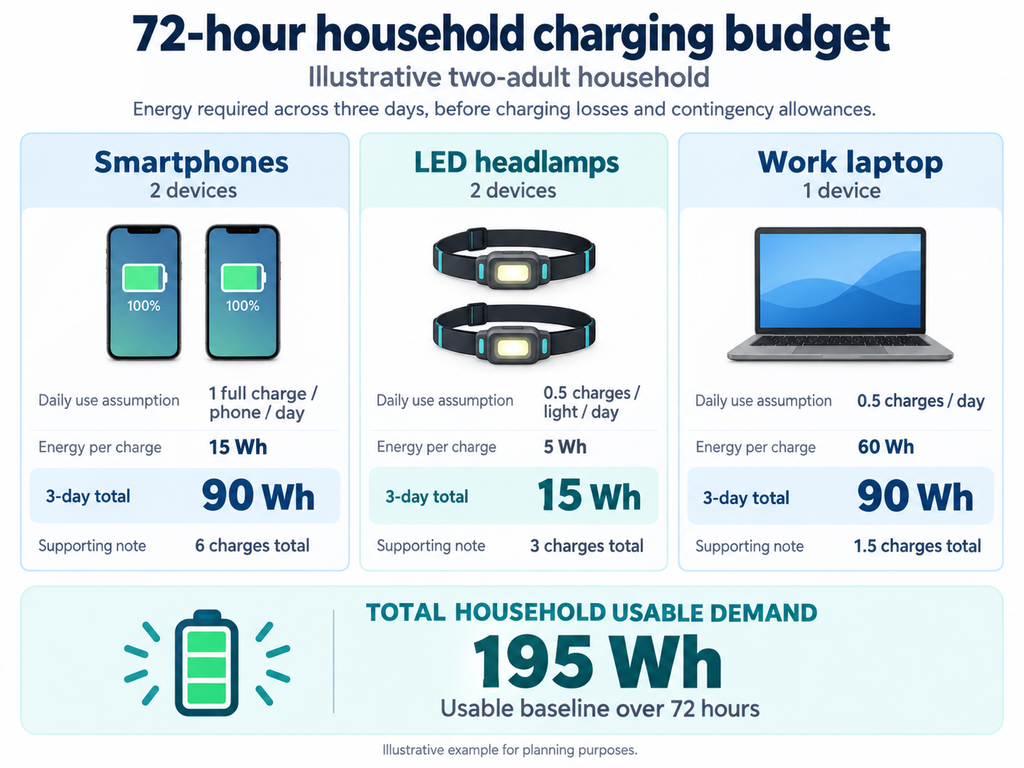
Below is a worked 72-hour energy plan for a two-person household maintaining phone communication, lighting, and limited laptop use:
| Device Type | Quantity | Daily Use Assumption | Energy per Charge | Total 3-Day Usable Demand |
|---|---|---|---|---|
| Smartphones | 2 | 1 full charge / phone / day | 15 Wh | 90 Wh (6 charges total) |
| LED Headlamps | 2 | 0.5 charges / light / day | 5 Wh | 15 Wh (3 charges total) |
| Work Laptop | 1 | 0.5 charges / day (1.5 total) | 60 Wh | 90 Wh (1.5 charges total) |
| TOTAL HOUSEHOLD USABLE DEMAND () | 195 Wh Usable Baseline |
Calculating Required Battery Capacity
To determine the nominal battery capacity () needed to supply this 195 Wh usable demand, use the formula:
Where is initial storage state (1.0 for 100% pre-charge, 0.80 for 80% stored charge), and is assumed energy-transfer efficiency (0.80 / 80%).
Scenario A: Pre-Charged to 100% Before a Storm ()
If you top off your power banks to 100% before a forecasted storm:
Adding a 20% contingency margin () brings the target nominal capacity to ~292.5 Wh.
Scenario B: Stored Long-Term at 80% Charge ()
If an unexpected blackout occurs while batteries are stored at 80% charge:
Adding a 20% contingency margin () brings the target nominal capacity to ~365.6 Wh.
Evaluating an Illustrative Four-Power-Bank Hardware Kit
As one illustrative arrangement, consider a four-bank household reserve consisting of:
- One 25,000 mAh (92.5 Wh) Laptop Power Bank
- Three 20,000 mAh (74 Wh) Power Banks ()
- Total Stored Nominal Capacity ():
- Delivered Energy at 100% Pre-Charge (): Delivers 251.6 Wh usable energy (). This covers the 195 Wh baseline demand with a ~29% contingency reserve.
- Delivered Energy at 80% Stored Charge (): Delivers 201.3 Wh usable energy ().
Assumption & Contingency Note: This four-bank kit is an assumption-based scenario, not a guaranteed universal 72-hour solution. At 80% initial charge and 80% transfer efficiency, it delivers 201.3 Wh—satisfying the 195 Wh baseline need with a modest ~3.2% spare margin, rather than a full 20% contingency allowance. If real-world transfer efficiency falls to 70% (e.g., ), the kit will fall short of the 195 Wh baseline. Older batteries, lower efficiency, or extra device usage will reduce available energy. If your household needs several hundred watt-hours of backup energy, a compact portable power station may be worth comparing against multiple USB power banks. Compare usable capacity, charging outputs, price, size, and initial charge level—not just advertised watt-hours. A 256–300 Wh power station will not necessarily deliver the same usable energy as the four-bank example. For households requiring ~300 Wh+ of backup capacity, an entry-level compact power station (~256–300 Wh) may offer a competitive alternative.
Single 20,000 mAh vs. Dual 10,000 mAh Power Banks
| Configuration | Single 20,000 mAh Power Bank | Dual 10,000 mAh Power Banks |
|---|---|---|
| Total Weight | ~380 grams | ~360 grams total (2x 180g) |
| Single-Port Output | High (often 45W–65W+ on laptop-class models) | Moderate (frequently 15W–45W) |
| Portability | Single central battery brick | Flexible; split between two people |
| Redundancy | Single unit; if lost, all power is lost | Two independent units; 50% backup retained |
| Best Application | Laptop charging & central family hub | Pocket carry, individual phone charging |
When evaluating 20000mah power banks, holding two 10,000 mAh power banks instead of a single 20,000 mAh unit provides two independent energy sources. If one unit is misplaced, the household retains half its backup capacity. However, keep at least one 65W+ high-wattage power bank on hand if you must power a laptop.
7. How to Recharge During an Extended Outage
During multi-day grid failures, stored battery energy will eventually run out. Plan for safe replenishment.
Vehicle Recharging Rules
Recharging a 20,000 mAh power bank from a vehicle’s USB-C port depends on the power bank’s accepted input wattage, vehicle adapter output, initial state, and charge curve; it can take several hours (for example, a 24,000 mAh bank accepting 30W input takes approximately 3.5 hours to recharge fully).
- Carbon Monoxide Warning: Never run a vehicle engine in an enclosed garage or covered structure. Always recharge while the vehicle is parked outdoors in an open, well-ventilated area.
- Starter Battery Monitoring: If charging via 12V accessory ports with the engine off, monitor battery levels so you do not drain the car’s starter battery.
Realistic Solar Panel Expectations
Small folding USB solar panels (10W to 21W) can supplement power banks during extended blackouts, but expectations must be calibrated:
- Window Glass Barriers: Standard window glass reflects and absorbs light spectrums. Solar charging through apartment window glass is inefficient and generally results in substantial output drops.
- Variable Outdoor Performance: Outdoor solar performance varies widely with sunlight intensity, panel alignment, heat, and power bank charge controllers. As an illustrative example, a 21W folding panel in direct outdoor sunlight might deliver 5W to 10W of real power, requiring extended exposure over a clear day to top off a 10,000 mAh power bank.
8. Storing and Maintaining Emergency Batteries
Proper battery care protects performance and extends the operating lifespan of lithium-ion cells.
Long-Term Preservation vs. Emergency Readiness
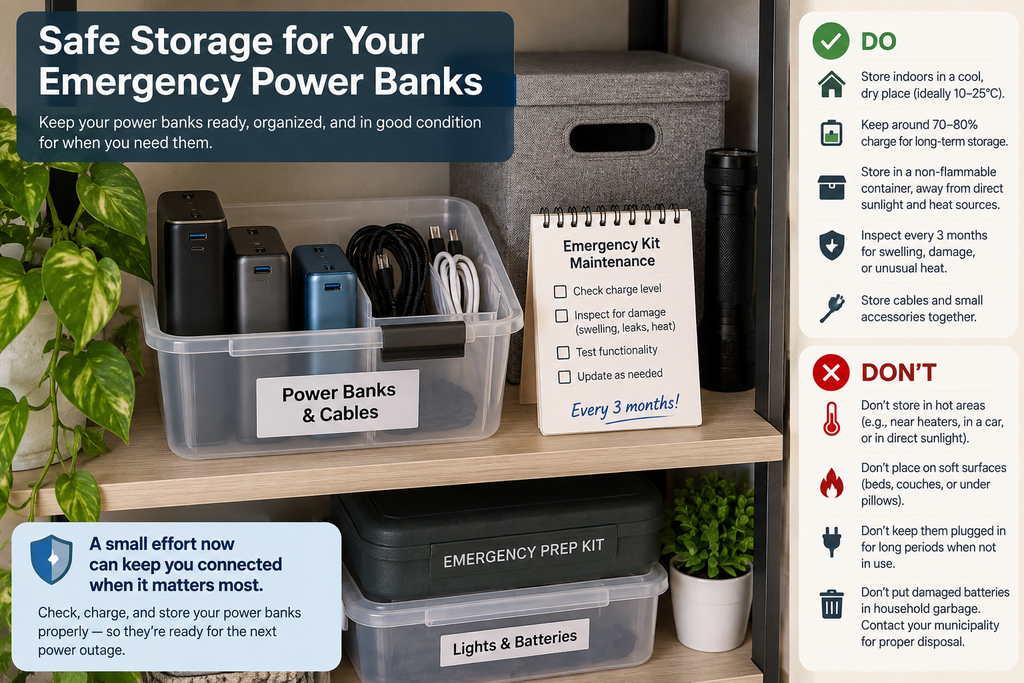
- Health Canada Long-Term Storage Guidance (~50% Charge): Official guidance from Health Canada on lithium-ion battery safety recommends storing lithium-ion batteries at approximately 50% state of charge in a cool location, with a maintenance check every three months, if they will remain unused for long periods. Storing cells at 100% or 0% for months accelerates chemical degradation.
- Emergency Readiness Compromise (~70%–80% Charge): For emergency preparedness, storing power banks at ~70% to 80% charge represents a practical compromise—preserving cell health while retaining enough immediate energy for an unexpected blackout. Stored-charge targets should reflect your readiness priorities, manufacturer instructions, and maintenance frequency.
- Pre-Storm Top-Off (100% Charge): When a severe storm or blackout is forecasted, top off your emergency power banks to 100% capacity immediately before the event. Do not leave batteries stored at 100% for months at a time.
Safe Storage Environment and Damaged Battery Safety
- Cool, Dry Storage Location: Store power banks in a cool, dry, elevated location away from direct sunlight, flammable soft furnishings, and primary emergency exit routes or doorways. Allow open airflow during active charging or discharging; never charge a power bank under pillows, couch cushions, or inside closed drawers.
- Damaged Battery Safety Procedure: Routinely inspect power banks for physical swelling, bulging, chassis cracking, or unusual heat during charging. Stop using or charging a power bank that is swollen, damaged, leaking, or becoming unusually hot. Do not put it in household garbage or a regular battery collection box. Contact your municipality or an appropriate hazardous-battery collection service for specific handling and disposal instructions. If a battery is smoking or appears to be catching fire, move away immediately and contact emergency services.
Quarterly Maintenance Routine
Set a calendar reminder every three months (quarterly):
- Retrieve power banks from storage and inspect charge levels.
- Check for any physical damage or cell swelling.
- Recharge or adjust units to ~80% for long-term storage (or top off to 100% ahead of peak storm season).
- Inspect USB cables for fraying, bends, or damage.
Conclusion: Actionable Next Steps
Establishing a practical household charging plan requires three simple steps:
- Calculate Your 72-Hour Demand: Count your household’s phones, tablets, and laptops. Estimate their combined 72-hour usable energy requirement in Watt-hours using the worksheet in this guide.
- Select Independently Certified Hardware: Choose enough total Watt-hours for your household’s planned outage duration. Look for independently certified products and verify the applicable certification for each model (referencing the ANSI/CAN/UL 2056 safety standard for power banks rated up to 100 Wh).
- Set Up a Quarterly Maintenance Routine: Store your power banks in a cool, dry place with durable USB-C cables, and set a quarterly calendar reminder to inspect charge levels and cell condition.
For guidance on extending emergency backup to other critical household essentials, read our companion guides on backing up home Wi-Fi routers and fiber ONTs or our overview on selecting portable power stations for household appliances.